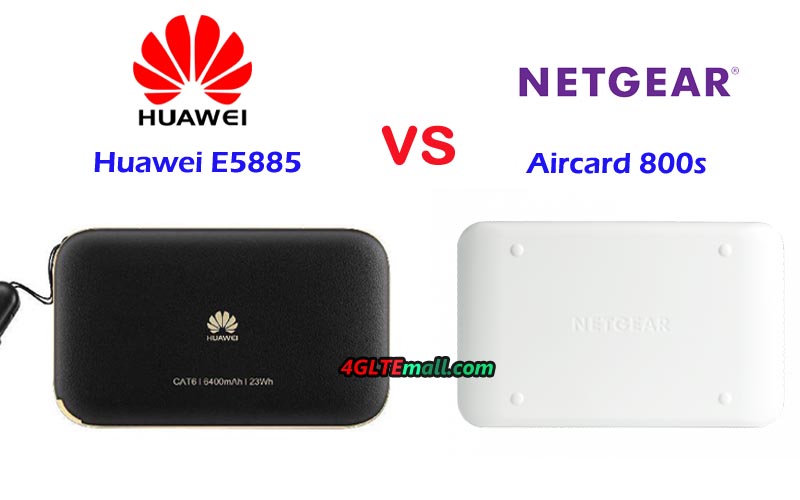
Huawei E5885Ls-93a VS Netgear AC800s

As one of the top networking equipment vendor, Netgear had presented many 4G WiFi routers to the public such as the well-known Nighthawk M1, Aircard 810s, Aircard 815s(also known as AT&T Unite Explore) and now a new mobile WiFi router Aircard 800s is available for Australian network provider Optus and it got a new name Optus 4G WiFi modem 800S. The aggressive Chinese competitor Huawei also follows the steps to present new wireless router even though it has many 4G pocket WiFi router available for various network providers such as Huawei E5788, E5787, E5786, E5770, etc…Now the Huawei E5885 is available. Somebody may have the question: What’s the difference between the Netgear Aircard 800s and Huawei E5885? Which one is better to buy for global travel? You may find the answers in this article.

Aircard 800s VS Huawei E5885 Appearance and Interface

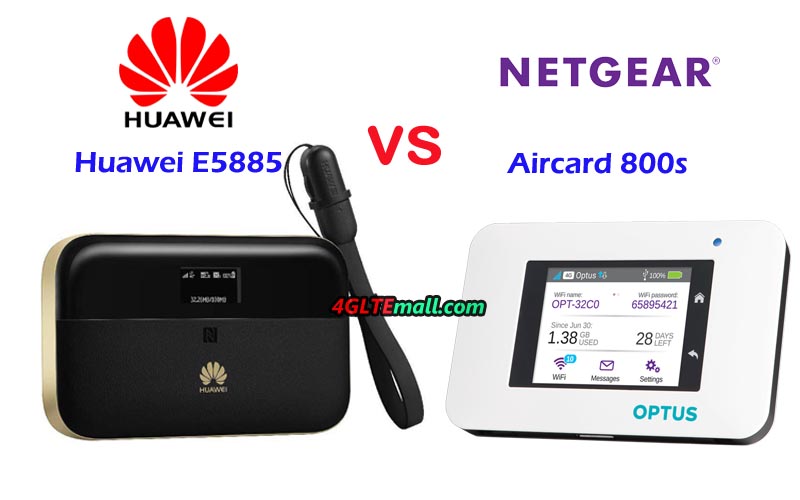
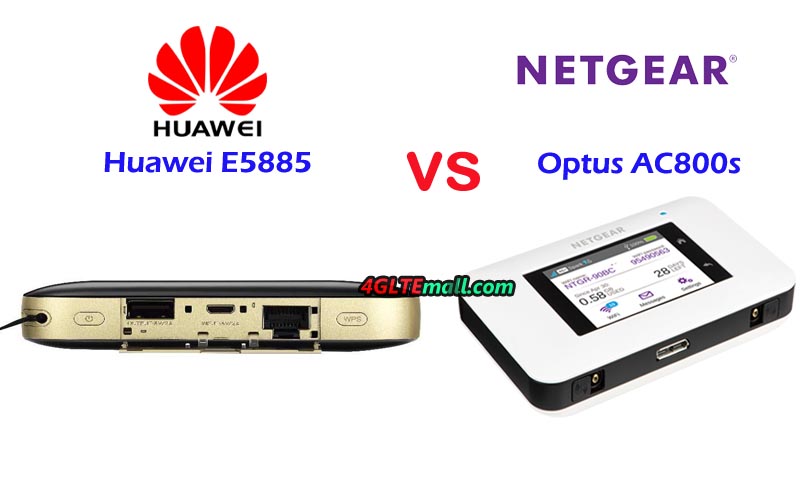
If you are familiar with other Netgear mobile hotspot routers, you may know the Netgear 4G mobile hotspots are in very similar design, so as the Netgear Aircard 800s. There is a touchscreen on the front, at the side of the display, there are a Home button and Back button for operation. The Optus logo is also at the side of the screen. The power button is on the top edge side while on the opposite side, there is the USB 3.0 port and two connectors for external LTE antennas. The connector type is TS-9 and covered by two small caps. The back cover could be opened and the battery is removable for exchange and inserting the SIM card.


Unlike most of other Huawei Mobile WiFi 4G, the Huawei E5885 has different features. On the front, there is a small LED screen to show the internet connection status, but it’s not a touchscreen. The Huawei logo is below the screen. The power button and WPS button are on the top edge side. Between the two buttons, there is a small cap, open it, you will see the Ethernet port(RJ45) and two USB ports(Input and output). There is no connector for an external antenna. The back cover could be opened, but the battery is built-in and non-removable. The SIM card slot and Micro SD storage card slot are available. And Huawei E5885 is thicker than Aircard 800s.


Huawei E5885 VS Netgear AC800S Specs and Features


From the appearance and interfaces, we can see the Netgear AC800S is a traditional 4G pocket WiFi router while the Huawei E5885 is a mobile hotspot with an Ethernet port. Then let’s have a comparison of the specs of Huawei E5885 and Netgear Aircard 800s:

Model Huawei E5885Ls-93a Netgear AC800S
Product type LTE Mobile Hotspot with Ethernet port LTE Mobile Hotspot
Category LTE Cat.6 LTE Cat.9
Chipset Hisilicon LTE Cat6 chipset Qualcomm MDM9240
Data rates DL 300Mbps/UL 50Mbps DL 450Mbps/UL 50Mbps
Supported 4G LTE frequency bands * FDD-LTE Band 1/2/3/4/5/7/8/19/20
* TDD-LTE: Band 38/40/41
B1, B3, B7, B28, B40
WLAN 802.11a/b/g/n/ac, dual-band 2.4GHz & 5GHz 802.11a/b/g/n/ac, dual-band 2.4GHz & 5GHz
Max support users 32 users 15 users
MIMO 2 X 2 MIMO 2 x 2 MIMO
Connector for external antenna No connector Two, TS-9 jacks
Buy Antenna N/A Netgear AC800s External Antenna
App management Huawei Hilink APP 3.0 Netgear Aircard APP
SIM type Micro SIM Micro SIM
Battery Non-removable, 6400mAh Removable, 2930 mAh
Dimensions  112.00 x 69.20 x 23.00mm 110 x 68 x 16.1 mm
Ethernet Port On port for WAN/LAN port(RJ-45) No
Datasheet download Huawei E5885 Datasheet Netgear AC800S Datasheet
User Manual Huawei E5885 Manual Optus 4G modem 800S Manual
Other features Power bank, CA, NFC 3 band CA
Firmware download Huawei E5885 Firmware Netgear AC800S Firmware
Drivers Huawei E5885 driver Netgear AC800S driver
Reviews Huawei E5885 Review Netgear AC800s review
Price 279.00USD 199.00USD


Summary

From the specs table, we can see the Netgear Aircard 800s(Optus 4G WiFi modem 800s) is more advanced technology, it supports LTE cat.9 and can achieve download speed up to 450Mbps while the Huawei E5885Ls-93s supports LTE Cat.6 and achieve download speed up to 300mbps. They are configured with a different chipset. The Optus 4G WiFi modem 800s supports less LTE frequency bands than that of Huawei E5885LS-93a, so Huawei E5885ls-93 would support more LTE network providers worldwide. Huawei Mobile WiFi E5885 supports 32 wireless users while Netgear AC800S supports only 15 users. However, there is no external antenna connector in Huawei E5885, which is not good for users who will go the areas with weak signal.


The Huawei E5885 large battery pack is really good, the capacity of 6400mAh makes it work like a mobile power bank to charge other devices. And the RJ45 Ethernet port is for both LAN and WAN, which is very useful for travel. From the specs comparison, we can conclude that the Optus 800s would provide faster surfing speed with advanced technology. However, the Huawei E5885 powerful and practical functions are also attractive and friendly for users. If you just need to get faster speed, the Netgear 800 is recommended and the price is attractive. But if you want a powerful pocket WiFi with multi-functions, the Huawei E5885 would be no doubt better to consider.


Huawei E5787 VS ZTE MF980

As the two important networking equipment vendors from China, Huawei and ZTE are always competing with each in the global market, so as their wireless products. Huawei E5787 and ZTE MF980 are two latest new 4G LTE pocket WiFi in 2017. Some users may feel interested in the two mobile WiFi hotspots, but somebody may be unfamiliar with the two portable 4G router and have questions: What’s the difference between Huawei E5787 and ZTE MF970? Which one is better to buy? We will review the specs and features of the two mobile routers to get the answers.

Huawei E5787 VS ZTE MF980 UFi Appearance and Interfaces


ZTE MF980 UFi was available earlier than Huawei E5787, it’s launched to Europe market. Like its predecessor ZTE MF970, it has a 1.44 TFT screen on the front and the ZTE and UFi are at the two side of the screen. On the top side, there is the Power and FUNC button to operate the settings. A small hole is at the side of the power button for Reset. Like other ZTE LTE UFi, On the opposite edge side, there are two connectors for an external LTE antenna, the connectors are located together covered by a small cap. The USB 3.0 port is in the middle, and the Micro SIM card slot is at the side of the USB port. The battery of ZTE MF980 is built-in, and the back cover can’t be opened.

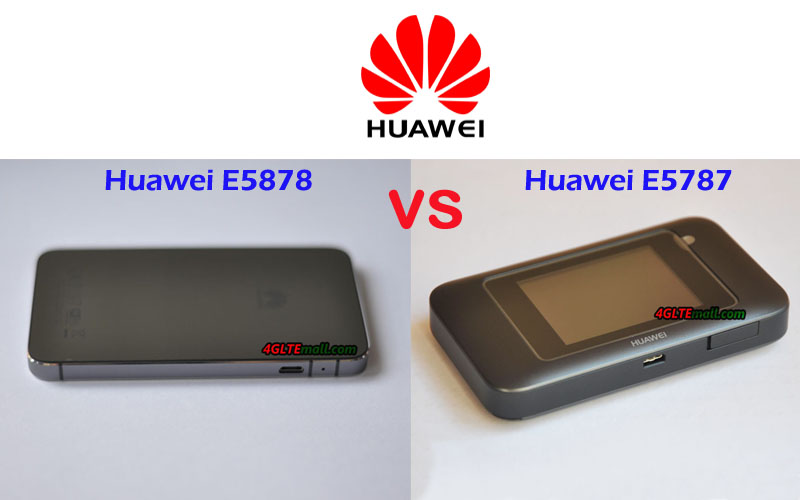
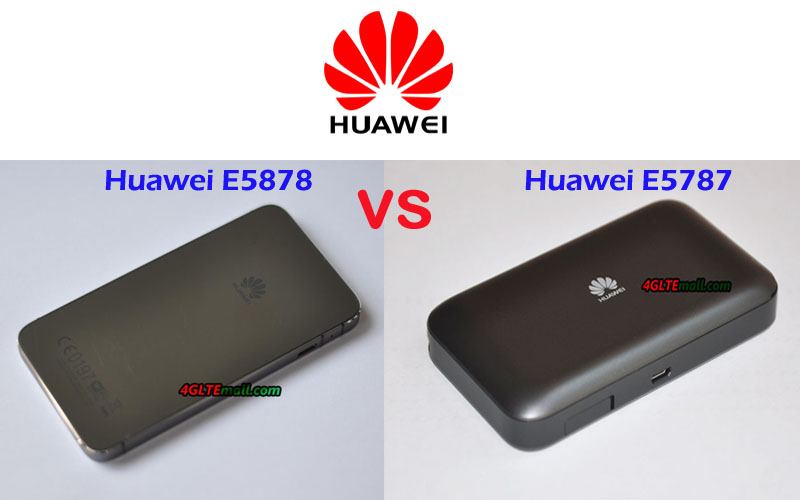
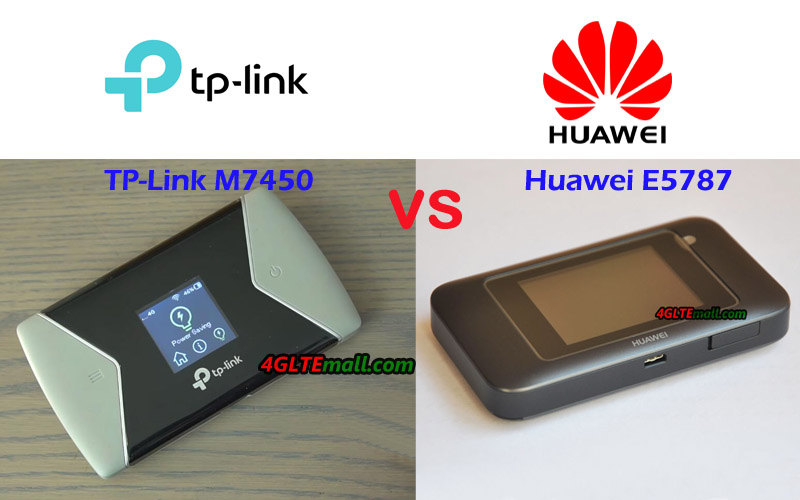
Unlike the ZTE MF980, Huawei E5787 provides the better user experience. First, it has a 2.4 inch touchscreen to display internet connection status and a user can do settings through the screen like operating a smartphone. There is an only home button on the top edge side while the opposite side located the USB port and two connectors for antennas. The back cover of Huawei E5787 could be removed and different from its predecessor Huawei E5786, the battery could be removed for exchange. The SIM card slot is below the battery.

ZTE MF980 UFi VS Huawei E5787 Specs and Features

From the appearance, we can see the two mobile wifi have much difference in design. Then let’s have a look at the Huawei E5787 specs and ZTE MF980 Specs for a comparison:


Model Huawei E5787 ZTE MF980 Ufi
Product type LTE Mobile Hotspot LTE Mobile Hotspot
Category LTE Cat.6 LTE Cat.9
Chipset  HiSilicon LTE Cat6 Chipset (Cortex A9 Processor) Qualcomm Cortex-A7 1.2GHz
Data rates DL 300Mbps/UL 50Mbps DL 450Mbps/UL 50Mbps
Supported 4G LTE frequency bands * Huawei E5787s-33a: Band 1/3/5/7/8/20
* Huawei E5787Ph-67a: Band 1/3/5/7/8/28
* FDD-LTE: B1/B3/B5(26)/B7/B8/B20/B28/B32* TDD-LTE: B40(or B38 or B41)
WLAN 802.11a/b/g/n/ac, dual-band 2.4GHz & 5GHz 802.11a/b/g/n/ac, dual-band 2.4GHz & 5GHz
Max support users 10 users 32 users
MIMO 2 X 2 MIMO 2 x 2 MIMO
Connector for external antenna Two, TS-9 jacks Two, TS-9 jacks
Buy Antenna Huawei E5787 Antenna ZTE MF980 External antenna
App management Huawei Hilink APP ZTELINK APP
SIM type Micro SIM Micro SIM
Battery 3000mAh 2200mAh
Dimensions 109.00 x 58.00 x 7.50mm  122 * 65 * 10.6mm
Ethernet Port No No
Datasheet download Huawei E5787 Datasheet ZTE MF980 Datasheet
User Manual Huawei E5787 Manual ZTE MF980 User Manual
Other features 2 band CA 2 band CA
Firmware download Huawei E5787 Firmware ZTE MF980 Firmware
Drivers Huawei E5787 drivers ZTE MF980 Driver
Reviews Huawei E5787s-33a Review ZTE MF980 Review
Price 269.00USD 199.00USD
Buy Huawei E5787 Buy ZTE MF980 Buy

Summary

From the specs table, we can see the ZTE MF980 is technically more advanced which could support LTE download speed up to 450Mbps on LTE Cat.9. The Huawei E5787 supports LTE download speed to 300Mbps on LTE Cat.6. However, the newer model Huawei E5787 is more user-friendly, it has the touchscreen for settings and the removable battery is a very good feature for users. And Huawei E5787 has a large battery capacity which provides longer working time. They both have two connectors for two TS-9 external antennas, so users can use the same antenna as the two mobile routers. Like other Huawei Mobile WiFi, Huawei E5787 has two variant models, which covers different LTE band combination and could be used in more areas with the unlocked E5787.

In our opinion, the Huawei E5787 is recommended 4G LTE pocket WiFi with the good features for users. However, ZTE MF980 is also a good traditional mobile WiFi router. And the ZTE MF980 price is attractive now. If you care about the price, ZTE MF980 is a good budget one to buy.

AT&T Unite Pro VS MiFi Liberate

AT&T had presented many 4G mobile hotspots to the public for its data plan. The AT&T Unite Pro and AT&T MiFi Liberate are two hot models. However, for those who are unfamiliar with AT&T products, they may don’t know the two mobile hotspots. If they want to buy a 4G mobile router from the two routers from AT&T, they may ask: What’s the difference between AT&T Unite Pro and Liberate? Which one is better to buy? We will review the specs of the two LTE routers to find the answers.

AT&T Unite Pro
AT&T Unite Pro

AT&T Unite Pro VS Liberate Appearance

Made by Novatel Wireless, the MiFi Liberate is probably the most interesting-looking hotspot, whose shape is sort of like a folded paperback book—it’s basically a flat rectangle with a big circular bump on the back. The AT&T Liberate is constructed from faintly patterned matte black plastic, along with shiny black plastic around the 2.8-inch display. There’s a Power button on the top left, a microSD card slot on the bottom, and a SIM card slot on the back that’s accessible when you remove the battery. The capacitive 2.8-inch color TFT LCD features 400-by-240-pixel resolution.

AT&T Unite Pro
AT&T Unite Pro

The AT&T Unite Pro was available much later than MiFi Liberate, and Unite Pro comes from Netgear model Aircard 781s. Like other Netgear 4G LTE Routers, the Unite Pro has a touchscreen with a data usage meter, and the Home and back buttons are at the side of the screen. The power buttons are on the top edge side while the opposite side located the USB 3.0 port and two connectors for external antennas. The back cover can be opened to insert the SIM card and the battery is removable for batter exchange.

ATT MiFi Liberate
ATT MiFi Liberate

AT&T MiFi Liberate VS Unite Pro Specs

Model AT&T Unite Pro 781S AT&T MiFi Liberate
Product type LTE Mobile Hotspot LTE Mobile Hotspot
Category LTE Cat.4 LTE Cat.3
Chipset Qualcomm MDM9225 Qualcomm
Data rates DL 150Mbps/UL 50Mbps DL 100Mbps/UL 50Mbps
Supported 4G LTE frequency bands B2, B4, B5, B17 B2, B4, B5, B17
WLAN 802.11 b/g/n, dual-band 2.4GHz & 5GHz 802.11 b/g/n, 2.4GHz
Max support users 15 users 10 users
MIMO 2 x 2 MIMO
Connector for external antenna Two, TS-9 jacks NO
Buy Antenna AT&T Unite Pro External Antenna NO
App management Netgear Aircard APP
SIM type Micro SIM Standard SIM
Battery Removable, 4020 mAh Removable, 2600 mAh
Dimensions 112 x 68 x 19mm 4.1 x 2.9 x 0.9 inches
Ethernet Port No No
Datasheet download AT&T Unite Pro Datasheet AT&T MiFi Liberate Datasheet
User Manual AT&T Unite Pro User manual AT&T MiFi Liberate User manual
Firmware download ATT Unite Pro Firmware AT&T MiFi Liberate Firmware
Drivers ATT Unite Pro drivers AT&T MiFi Liberate drivers
Reviews AT&T Unite Pro review AT&T MiFi Liberate review
Price 269.00USD 129.00USD


Conclusion

From the specs table, we can see the Netgear Aircard 781s(AT&T Unite Pro) is more advanced than the MiFi Liberate. The AT&T Unite Pro support LTE cat.4 and it could achieve download speed up to 150mbps. The WLAN feature is more advanced. The battery of Unite Pro is more powerful and there are two connectors for an external antenna. When the AT&T MiFi Liberate was presented the first time, it may be the most advanced, but now it’s an old model and some technical features can’t meet the requirements from end-users and the upgrading LTE networks. However, as a basic LTE mobile pocket WiFi, its price is very attractive now. If you just need a decent LTE hotspot, it could be considerable, but if you concern the LTE surfing speed and want more powerful features from a mobile hotspot, the AT&T Unite Pro should be considered.

LTE, LTE-A and LTE-A Pro Evolution

LTE is a standard for wireless communication and LTE Advanced / LTE Advanced Pro (Cat 6 to Cat 19) is a high-speed version of LTE, sometimes marketed as LTE+, 4G+, 4GX,4.5G or 4G LTE Ultra. LTE support varies from country to country, and the speed may vary depending on user location and how fast they’re traveling.


LTE (Cat 1~5)

  • LTE has been introduced in 2012 in order to provide high data rate mobile broadband connection.
  • It has been introduced to provide 10 times faster data rate compared to 3G.
  • LTE provides 100 Mbps.
  • LTE has been specified in 3GPP Rel.8.
  • LTE supports carrier bandwidth of 20 MHz.

LTE Advanced (Cat 6~16)

  • LTE Advanced is an enhancement to LTE with data rate increase to the factor of 10.
  • It supports carrier aggregation and higher order MIMO techniques.
  • It supports the data rate of 1 Gbps in downlink (From eNB to UE) and 500 Mbps in uplink direction (From UE to eNB).

LTE Advanced Pro (Cat 17~19)

  • It is enhanced version of LTE Advanced to support higher data rate beyond 3 Gbps.
  • It supports increased Bandwidth, increased efficiency and improved latency.
  • It makes use of both licensed (400 MHz to 3.8 GHz) and unlicensed (5GHz) spectrum to support up to 32 carriers of 20MHz each.
  • It is backward compatible with existing LTE and LTE Advanced devices.
  • It makes use of spectrum more efficiently by increasing number of antenna paths as well as multi beam approach. It serves single radio cell with 16 to 64 antenna paths.
  • It grows network capacity to about 200% without any additional spectrum or base stations.
  • Increased battery life about 10 times than LTE.

Five Best Buy WiFi Router in 2018

Since information is more and more important in our daily lives, most people can’t live without the internet. So to have a WiFi router would be very important for internet access. Now that the LTE technologies evolve to LTE advanced Pro, we will recommend five best buy WiFi router in 2018. They are with the latest LTE technologies and can provide fast internet speed for users.


We recommend the five best buy WiFi routers mainly based on the below the concerns:

  1. Network frequency bands compatibility: the WiFi hotspot best buy must be compatible with the popular LTE frequency bands for global use. The more frequency bands supported by the WiFi router, the more network carriers the WiFi router could work with.
  2. Fast Internet connection speeds: the best buy MiFi must have the ability to provide fast wireless internet speed at last up to download speed up to 300mbps with carrier aggregation technology.
  3. Large battery pack for long-time use: the best buy mobile hotspot must have a large battery, which would provide long working time, it would be much better if the LTE WiFi routers could charge other devices such as smartphones, Pads or other terminals.
  4. Easy management for settings and data consumption: the WiFi router best buy must provide a user-friendly experience for networking settings and data consumption.
  5. Better to have Ethernet for WAN or LAN: sometimes, when the user travels to other countries and 4G SIM is not available, or the terminal doesn’t have the ability to connect via WiFi, the Ethernet port may be a good alternative for internet connection.


Below are the five best buy WiFi routers to recommend for 2018:


Model Huawei E5788u-96a Specs Netgear Nighthawk M1 Specs Huawei E5885Ls-93a Specs Netgear Aircard 810s Specs AT&T Unite Explore 815S Specs
Product type 4G Mobile WiFi 4G Mobile Hotspot with Ethernet port 4G Mobile Hotspot with Ethernet port 4G Mobile WiFi 4G Mobile WiFi
Product Image
Category LTE Cat.16 LTE Cat.16 LTE Cat.6 LTE Cat.11 LTE Cat.9
Chipset Qualcomm MDM9250 Qualcomm MDM9x50 Hisilicon LTE Cat6 chipset Qualcomm Snapdragon X12 Qualcomm MDM9240
Data rates DL 1Gbps/UL 100Mbps DL 1Gbps/UL 100Mbps DL 300Mbps/UL 50Mbps DL 600Mbps/UL 100Mbps DL 450Mbps/UL 100Mbps
Supported 4G LTE frequency bands * FDD-LTE: Band 1/2/3/4/5/7/8/19/20/28
* TDD-LTE: Band 38/40/41/42
Telstra Nighthawk: Band 1/3/7/8/28
AT&T Nighthawk:  Band 1/2/3/4/5/7/12/29/30/66
* FDD-LTE Band 1/2/3/4/5/7/8/19/20/28
* TDD-LTE: Band 38/40/41/42
B1, B3, B7, B8, B28 B1, B2, B3, B4, B5, B7, B12, B17, B29, B30
WLAN 802.11a/b/g/n/ac, dual-band 2.4GHz & 5GHz 802.11a/b/g/n/ac, dual-band 2.4GHz & 5GHz 802.11a/b/g/n/ac, dual-band 2.4GHz & 5GHz 802.11a/b/g/n/ac, dual-band 2.4GHz & 5GHz 802.11a/b/g/n/ac, dual-band 2.4GHz & 5GHz
Max support users 32 users 20 users 32 users 15 users 15 users
MIMO 4 X 4 MIMO 4 X 4 MIMO 2 X 2 MIMO 2 x 2 MIMO 2 x 2 MIMO
Connector for external antenna No connector Two, TS-9 jacks No connector Two, TS-9 jacks Two, TS-9 jacks
Buy Antenna N/A Netgear Nighthawk M1 Antenna N/A Aircard 810s External Antenna AT&T Unite Explore External Antenna
App management Huawei Hilink APP Netgear Aircard APP Huawei Hilink APP 3.0 Netgear Aircard APP Netgear Aircard APP
SIM type Micro SIM Micro SIM Micro SIM Micro SIM Micro SIM
Battery Non-removable, 3000mAh Removable, 5040 mAh Non-removable, 6400mAh Removable, 2930 mAh Removable, 4340 mAh
Dimensions 129 x 65 x 13.5mm 105.5 x 105.5 x 20.35 mm  112.00 x 69.20 x 23.00mm 112 x 68.6 x 15.45mm 112 x 68.6 x 15.45mm
Ethernet Port No On port for LAN port(RJ-45) On port for WAN/LAN port(RJ-45) No No
Datasheet download Huawei E5788 Datasheet Netgear Nighthawk M1 Datasheet Huawei E5885 Datasheet Netgear AC810S Datasheet AT&T Unite Explore 815s Datasheet
User Manual Huawei E5788 Manual Netgear Nighthawk M1 Manual Huawei E5885 Manual Telstra 4GX Advanced III Manual AT&T Unite Explore Manual
Other features 4CC CA 4 band CA, JumpBoost Power bank, CA, NFC 3 band CA 3 band CA
Firmware download Huawei E5788 Firmware Nighthawk M1 Firmware Huawei E5885 Firmware Aircard 810s Firmware ATT Unite Explore Firmware
Drivers Huawei E5788 Driver Nighthawk M1 Driver Huawei E5885 driver Aircard 810s driver ATT Unite Explore drivers
Reviews Huawei E5788 Review Netgear Nighthawk M1 AT&T Review Huawei E5885 Review Netgear Aircard 810s review AT&T unite explore review
Price 499.00USD 459.00USD 279.00USD 249.00USD 349.00USD
To Buy Buy Huawei E5788u-96a Netgear Nighthawk M1 Unlocked Buy Huawei E5885Ls-93a Buy Netgear AC810S Buy ATT Unite Explore Unlocked Buy

These WiFi router best buy are recommended for 2018. The Huawei E5788u-96a and Netgear Nighthawk M1 are the most advanced WiFi router for a pocket. The Nighthawk M1 has one Ethernet port for LAN. The Netgear AirCard 815S is in the rugged design for outdoor activities. Huawei E5885Ls-93a has an Ethernet port and has the large battery to charge other devices. For more details of each WiFi router, click the reviews for them. They are all best buy MiFi for 2018.


Huawei E5787 VS ZTE MF970

More and more people are looking for LTE-A mobile WiFi for daily lives. Huawei E5787 and ZTE MF970 are the two popular LTE-A mobile WiFi hotspots. For those who are unfamiliar with ZTE and Huawei mobile WiFi hotspots, they may feel confused if they want to buy one from the two. They may ask: What’s the difference between Huawei E5787 and ZTE MF970? Which one is better to buy? We will review the appearance, interfaces, specs and other features for a comparison to find answers.

ZTE MF970 VS Huawei E5787 Appearance and Interfaces

ZTE MF970, also called ZTE UFi MF970 was available in the market for some network providers in Europe since 2016. It has black and grey colors. On the front, there is a 1.44 inch screen to show the network providers, internet connection status. The ZTE and UFi are located on the two sides of the screen. On the top edge side, there are two TS-9 connectors for external antennas. The USB port is in the middle of the two antenna connectors. On the opposite edge side, the SIM card slot, power and Func buttons are located. The battery of ZTE MF970 is built-in, so the back cover and battery both can’t be removed.

Huawei E5787, also called Huawei Mobile WiFi touch, was available since 2017. Since the mobile WiFi touchscreen become the mainstream, the Huawei E5787 was also configured with a 2.4-inch touchscreen, where it will show the network providers, data, WiFi, battery, signal etc…Users can do simple settings from the touchscreen. On the top edge side, the power button is available while the opposite edge side located the two TS-9 connectors for  4G LTE external antenna with USB 3.0 port. Unlike ZTE UFi MF970, the back cover could be opened and the battery of Huawei E5787 300Mbps could be removed. After removing the battery, the Micro SIM card slot is there.

Huawei E5787 VS ZTE MF970 Specifications

From the appearance, we can see the Huawei E5787 seems better than ZTE MF970 based on the highlight feature of touchscreen and removable battery. The operation of ZTE MF970 could be done via the power and Func buttons, however, the operation is not user-friendly per our test. Now let’s have a comparison of the Huawei E5787 specs and ZTE MF970 specs:


Model Huawei E5787 ZTE MF970 Ufi
Product type LTE Mobile Hotspot LTE Mobile Hotspot
Category LTE Cat.6 LTE Cat.6
Chipset  HiSilicon LTE Cat6 Chipset (Cortex A9 Processor) Qualcomm MDM9230
Data rates DL 300Mbps/UL 50Mbps DL 300Mbps/UL 50Mbps
Supported 4G LTE frequency bands * Huawei E5787s-33a: Band 1/3/5/7/8/20
* Huawei E5787Ph-67a: Band 1/3/5/7/8/28
B1/2/3/4/7/8/20/28/12&17
WLAN 802.11a/b/g/n/ac, dual-band 2.4GHz & 5GHz 802.11a/b/g/n/ac, dual-band 2.4GHz & 5GHz
Max support users 10 users 14 users
MIMO 2 X 2 MIMO 2 x 2 MIMO
Connector for external antenna Two, TS-9 jacks Two, TS-9 jacks
Buy Antenna Huawei E5787 External Antenna ZTE MF970 External antenna
App management Huawei Hilink APP ZTELINK APP
SIM type Micro SIM Micro SIM
Battery 3000mAh 2300mAh
Dimensions 109.00 x 58.00 x 7.50mm 104 x 65 x 14.3mm
Ethernet Port No No
Datasheet download Huawei E5787 Datasheet ZTE MF970 Datasheet
User Manual Huawei E5787 Manual ZTE MF970 User Manual
Other features 2 band CA 2 band CA
Firmware download Huawei E5787 Firmware ZTE MF970 Firmware
Drivers Huawei E5787 drivers ZTE MF970 Driver
Reviews Huawei E5787 Review ZTE MF970 Review
Price 269.00USD 179.00USD

Summary

From the specs, we can see the Huawei E5787 and ZTE MF970 both support download speed to 300Mbps and upload speed to 50Mbps based on the LTE category 6. The Huawei E5787 has two variant models mainly for Australia, Europe, and Middle East markets while the ZTE MF970 Rogers covers the popular LTE frequency bands all over the world, especially the band 4, which is the most popular band in American countries. Huawei E5787 could support maximum up to 10 WiFi-enabled devices while ZTE MF970 supports maximum 14 users. However, Huawei E5787 has a removable battery of 3000mAh while ZTE MF970 has a non-removable battery of 2300mAh, which is a little bit weak.

The Huawei E5787 seems to be better in all the aspects; however, the latest Huawei E5787 price is much higher than ZTE MF970 price. If you don’t care about the price, we would recommend Huawei E5787 mobile WiFi touch to you. The ZTE MF970 is also technically WiFi router best buy and the price of ZTE MF970 is very good now even though it’s not a new model. The performance is not bad based on Qualcomm chipset.
AT&T Unite Pro VS Unite Explore

As the most important network carrier in the USA, AT&T has a large range of wireless devices for 4G LTE networks, including the wireless mobile hotspot. AT&T had presented a series of 4G mobile WiFi hotspots in the name of Unite. The AT&T Unite Pro and Unite Explore are the two popular 4G LTE WiFi routers. For those people who are unfamiliar with AT&T Unite series product, they may ask: What’s the difference between AT&T Unite Pro and Unite Explore? Which one is more advanced and better? Read this blog and you may find the answers.

AT&T Unite Pro VS Unite Explore Appearance

The AT&T Unite Pro comes from the Netgear Aircard 781s and is customized to be AT&T Unite Pro. On the front of the screen, the AT&T Logo is available. Like other Netgear 4G mobile hotspot, the Unite Pro has a touchscreen with data usage meter, and the Home and back buttons are at the side of the screen. The power buttons are on the top edge side while the opposite side located the USB 3.0 port and two connectors for external antennas. The back cover can be opened to insert the SIM card and the battery is removable for batter exchange.


Following the Netgear AC781S design, the AT&T Unite Explore also has the same screen feature, the buttons, antenna connectors and USB ports are almost the same as that in Unite Pro 781s. The AT&T Unite Explore comes from Netgear Aircard 815s. The main difference from the appearance is the Unite Explore AC815S is in the rugged design, which is water and dust proof for outdoor activities.

AT&T Unite Pro VS Unite Explore Specifications

The appearance of the AT&T Unite Pro and Unite Explore are very similar except the Aircard 815s rugged design. Then let’s compare the AT&T Unite Pro Specs and Unite Explore Specs. The table below shows the two AT&T mobile hotspots specs and features:

Model AT&T Unite Explore 815S AT&T Unite Pro 781S
Product type LTE Mobile Hotspot LTE Mobile Hotspot
Category LTE Cat.9 LTE Cat.4
Chipset Qualcomm MDM9240 Qualcomm MDM9225
Data rates DL 450Mbps/UL 100Mbps DL 150Mbps/UL 50Mbps
Supported 4G LTE frequency bands B1, B2, B3, B4, B5, B7, B12, B17, B29, B30 B2, B4, B5, B17
WLAN 802.11a/b/g/n/ac, dual-band 2.4GHz & 5GHz 802.11 b/g/n, dual-band 2.4GHz & 5GHz
Max support users 15 users 10 users
MIMO 2 x 2 MIMO 2 x 2 MIMO
Connector for external antenna Two, TS-9 jacks Two, TS-9 jacks
Buy Antenna AT&T Unite Explore Antenna AT&T Unite Pro Antenna
App management Netgear Aircard APP Netgear Aircard APP
SIM type Micro SIM Micro SIM
Battery Removable, 4340 mAh Removable, 4020 mAh
Dimensions 112 x 68.6 x 15.45mm 112 x 68 x 19mm
Ethernet Port No No
Datasheet download AT&T Unite Explore 815s Datasheet AT&T Unite Pro Datasheet
User Manual AT&T Unite Explore Manual AT&T Unite Pro User manual
Other features 3 band CA
Firmware download ATT Unite Explore Firmware ATT Unite Pro Firmware
Drivers ATT Unite Explore drivers ATT Unite Pro drivers
Reviews AT&T unite explore review AT&T Unite Pro review
Price 349.00USD 269.00USD


Summary

From the spec table above, we can see the AT&T Unite Explore (Netgear AC815S) is more advanced than AT&T Unite Pro (Netgear AC781S). With LTE advanced technologies on LTE Cat.9, Unite Explore could achieve download speed up to 450Mbps, which is almost three times faster than that of Unite Pro. The ATT Unite Explore covers more LTE frequency bands than that of Unite Pro. The WiFi 802.11ac is available in Unite Explore but Unite Pro doesn’t have this feature. Both ATT Unite Explore and Unite Pro support up to 15 wireless users and has two TS-9 connectors for an external antenna. Except that, the AT&T Unite explore is better than Unite Pro in almost all the aspects. If you would buy one mobile hotspot from the two, it’s no doubt that AT&T Unite Explore is better to buy.


However, with the advanced features, the AT&T Unite Explore price is a little bit higher than Unite Pro price. So if you are sensitive to the price, the budget one Unite Pro may also be good for daily life.

AT&T Unite Explore AC815S VS Huawei E5787

LTE advanced is becoming the mainstream of the LTE evolvement. More and more people are considering upgrading their LTE gadgets to LTE advanced or LTE-A Pro. Huawei E5787 and Netgear Aircard 815s are two hot LTE-A mobile hotspots. If you want to buy one from the two 4G LTE router, you may ask: what’s the difference between Huawei E5787 and Netgear Aircard 815s? Which one is better to use? We will compare the Huawei E5787 with Netgear 815s from the appearance, specs and other features to find the answers for you.

Aircard 815S VS Huawei E5787 Appearance and interfaces

Huawei E5787 is the first Huawei mobile WiFi with a touchscreen, which is very useful to operate the settings for users. There is the only logo under the display. The home button is on the top edge side while the USB port and connectors for the external antenna are located at the opposite side. The antenna connectors are located together and covered by a small cap. The back cover could be opened and the battery could be removed. There is Micro SIM slot under the battery, but no Micro SD card slot.

The Netgear Aircard 815s is now only available for US network provider AT&T and got a new name of AT&T Unite Explore. The highlight feature is the Unite Explore is of rugged design which is water and dust proof for outdoor use. There is also a touchscreen on the front to show the internet connection status. The AT&T logo is on the left side of the screen while the Home and back buttons are on the right side. Like Huawei E5787, the home button of ATT Unite Explore is also on the top edge while the USB port and antenna connectors are on the opposite side. The connector of both routers is the TS-9 type. The difference is the Aircard 815s antenna connectors are located at the two sides of the USB port. The back cover and battery could also be removed. And the Micro SIM card slot is available.

Huawei E5787 VS Netgear AC815S Specifications

From the appearance and interfaces, we can see the AT&T Unite Explore 815S and Huawei E5787 are very similar. Only the rugged design of Unite Explore are special and can be cleared distinguished from other hotspots. Now let’s have a look at the Huawei E5787 specs and AT&T Unite Explore specs for more comparison:


Model AT&T Unite Explore 815S Huawei E5787
Product type LTE Mobile Hotspot LTE Mobile Hotspot
Category LTE Cat.9 LTE Cat.6
Chipset Qualcomm MDM9240  HiSilicon LTE Cat6 Chipset (Cortex A9 Processor)
Data rates DL 450Mbps/UL 100Mbps DL 300Mbps/UL 50Mbps
Supported 4G LTE frequency bands B1, B2, B3, B4, B5, B7, B12, B17, B29, B30 * Huawei E5787s-33a: Band 1/3/5/7/8/20
* Huawei E5787Ph-67a: Band 1/3/5/7/8/28
WLAN 802.11a/b/g/n/ac, dual-band 2.4GHz & 5GHz 802.11a/b/g/n/ac, dual-band 2.4GHz & 5GHz
Max support users 15 users 10 users
MIMO 2 x 2 MIMO 2 X 2 MIMO
Connector for external antenna Two, TS-9 jacks Two, TS-9 jacks
Buy Antenna AT&T Unite Explore External Antenna Huawei E5787 external Antenna
App management Netgear Aircard APP Huawei Hilink APP
SIM type Micro SIM Micro SIM
Battery 4340 mAh 3000mAh
Dimensions 112 x 68.6 x 15.45mm 109.00 x 58.00 x 7.50mm
Ethernet Port No No
Datasheet download AT&T Unite Explore 815s Datasheet Huawei E5787 Datasheet
User Manual AT&T Unite Explore Manual Huawei E5787 Manual
Other features 3 band CA 2 band CA
Reviews AT&T unite explore review Huawei E5787 Review
Price 349.00USD 269.00USD

Summary

From the specs table, we can the ATT Unite Explore is more advanced than Huawei E5787. With Qualcomm MDM9240 chipset and LTE Cat.9, AT&T Unite Explore could achieve download speed up to 450Mbps and upload speed to 50Mbps. The Huawei E5787 could support peak speed to 300Mbps with the support of LTE Category 6. The Netgear Aircard 815s supports more LTE frequency bands, but mainly for American areas. But it can also work in Europe, Africa, Middle East and Asia on the band 3 and band 7. The Huawei E5787 two variant models cover the LTE bands mainly for Australia, Asia, and Europe. So the unlocked AT&T Unite Explore could be used more widely than Huawei E5787 unlocked.

Regarding the WLAN features, the AT&T Unite Explore supports up to 15 users while Huawei E5787 supports 10 WiFi users. The AT&T 815s could support 3 band carrier aggregations while E5787 supports 2 band carrier aggregations. And Aircard 815s has a larger battery of 4340mAh while Huawei E5787 is configured with 3000mAh battery. The Unite Explore AC815s can charge other devices like a mobile power bank but Huawei E5787 doesn’t have this function. In summary, the AT&T Unite Explore AC815s is more advanced and better than Huawei E5787. However, the Aircard 815s price is higher than Huawei E5787 price. If you want an advanced LTE hotspot and don’t care about the price, the unlocked AT&T Unite Explore would be the right one. But if you need a budget one, the Huawei E5787 should be considered.


Huawei E5885 VS Huawei E5770

You may have known the Huawei Mobile WiFi Pro E5770, as the first generation of Huawei 4G mobile hotspot with Ethernet port and SIM card slot, Huawei E5770 had gained a very good reputation. And now Huawei presented a new upgraded 4G modem Ethernet model Huawei E5885, which also has an Ethernet port and SIM card slot. Somebody may ask: What’s the difference between the Huawei E5885 and E5770? What features had been upgraded in E5885? The questions would be answered in this article.

Huawei E5885Ls-93a VS Huawei E5770 Appearance and Interfaces

Huawei E5770 has a 0.96 inch OLED display on the front to show the internet connection status. Below the display, it’s Huawei logo. The power and WPS buttons are on the top edge side. The Ethernet port and USB input & output ports are covered by a cap. A user needs to open the cap to see the interfaces. The back cover can be opened. Open the back cover, the SIM card slot and SD card slot can be found. On the back cover, it indicates 5200mAh battery. The battery is built-in and non-removable. Unlike other Huawei Mobile WiFi, we can’t find the connectors for external antennas.

Following the design of Huawei E5770, the Huawei E5885 also has a small display on the front to show the connection status. The power button, WPS button, USB ports and Ethernet port are all in the same position like E5770. The difference is that the Huawei E5885 is thicker than the E5770, perhaps because it’s configured with a large battery of 6400mAh, which is shown on the back cover. The Huawei E5770 has black and white colors available while the new Huawei E5885 has the pink & black and black & gold colors.

Huawei E5770 VS Huawei E5885 Specs

From the appearance, we can see the two MiFi routers 4G are very similar in design. The thickness and colors are different. Then let’s have a look at the comparison of Huawei E5770 specs and Huawei E5885 specs. Since Huawei E5770 has only one variant model E5770S-320 and Huawei E5885 has only one variant model E5885Ls-93a. We will compare the Huawei E5770s-320 and E5885Ls-93a:

Model Huawei E5885Ls-93a Huawei E5770s-320
Product type LTE Mobile Hotspot with Ethernet port LTE Mobile Hotspot with Ethernet port
Category LTE Cat.6 LTE Cat.4
Chipset Hisilicon LTE Cat6 chipset Hisilicon LTE Cat4 chipset
Data rates DL 300Mbps/UL 50Mbps DL 150Mbps/UL 50Mbps
Supported 4G LTE frequency bands * FDD-LTE Band 1/2/3/4/5/7/8/19/20
* TDD-LTE: Band 38/40/41
* LTE Band 1/3/5/7/8/20/38
WLAN 802.11a/b/g/n/ac, dual-band 2.4GHz & 5GHz 802.11 b/g/n, Single-band 2.4GHz
Max support users 32 users 11 users
MIMO 2 X 2 MIMO N/A
Connector for external antenna No connector No connector
Buy Antenna N/A N/A
App management Huawei Hilink APP 3.0 Huawei Hilink APP
SIM type Micro SIM Standard 6-Pin SIM
Battery Non-removable, 6400mAh Non-removable, 5200mAh
Dimensions  112.00 x 69.20 x 23.00mm 106.0 × 68.4 × 22.5 mm
Ethernet Port On port for WAN/LAN port(RJ-45) On port for WAN/LAN port(RJ-45)
Datasheet download Huawei E5885 Datasheet Huawei E5770s-320 Datasheet
User Manual Huawei E5885 User Manual Huawei E5770 Manual
Other features Power bank, CA, NFC Power bank
Reviews Huawei E5885Ls-93 Review Huawei E5770s-320 Review
Price 249.00USD 229.00USD


Summary

From the specs table above, we can see the Huawei E5885Ls-93 is more advanced than Huawei E5770s-320. With upgraded Hisilicon LTE Cat.6 chipset, Huawei E5885 could achieve download speed up to 300mbps, which is double faster than that of E5770. With the similar design, the Huawei E5885 seems more fashion than Huawei E5770. And with the large battery of 6400mAh, Huawei E5885 would provide longer working time and make the power bank function stronger than E5770. Huawei E5885Ls-93 could support more LTE frequency bands which are widely available in Americans, Asia, Europe, and Australia, which makes it supports more network providers worldwide. Then it’s no doubt that the Huawei E5885Ls-93a is better than Huawei E5770. With reasonable higher price than that of E5770, we highly recommend the Huawei E5885 Mobile WiFi Pro 2 for your global travel.


Specifications of Huawei E5577S-324

  •  Model: Huawei E5577s-324
  • Color: White
  • Supported LTE frequency bands
    · FDD LTE: B1, B3, B5, B7, B8, B19, B20
    · WCDMA: B1, B2, B5, B6, B8, B19
    · GSM: 850, 900, 1800, 1900 MHz
  • LTE Data speed: 150 Mbps (* 2)
  • Weight: Approx 112g
  • Battery Capacity: 3000mAh
  • OS: Windows Vista SP1 or later, Mac OS 10.7 or later
  • SD Card: 32 GB
  • SIM card: Standard SIM
  • Display: 1.45 inch TFT
  • Continuous standby time / continuous communication time: Maximum about 600 hours  / maximum of about 12 hours
  • Wi-Fi: 300 Mbps (* 2)
  • Number of concurrent units: 10 x Wi-Fi connection / One x USB connection
  • Size
    · Height: 58mm
    · Width: 96.8mm
    · Thickness : 17.3mm
  • Accessories: AC adapter for charging the main unit, USB cable for charging