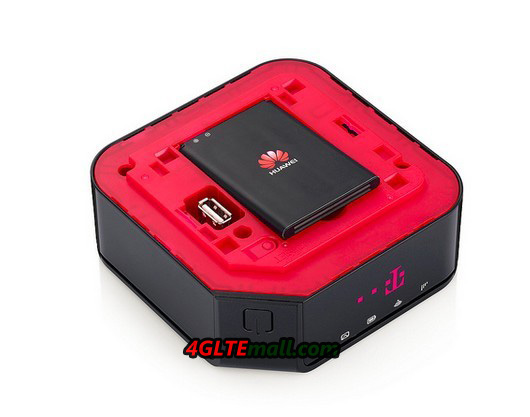
Huawei E5170 Home Net Box for T-Mobile Austria

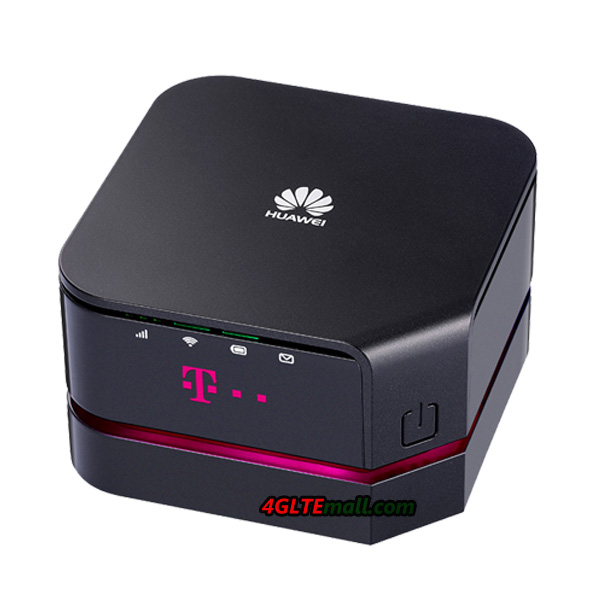
Since September 2013, the Austrian provider T-Mobile offered a powerful new LTE router Home Net Box. The device is a combination of stationary and mobile router, and is manufactured by Chinese manufacturer Huawei. The factory model number is Huawei E5170s-22, which was already shown in February 2013 at Mobile World Congress in Barcelona. With peak speed of up to 150 MBit/s for downsteam (LTE Category 4), T-Mobile Home Net Box is one of the fastest home wireless routers available on the market.

Built-in rechargeable battery and docking station

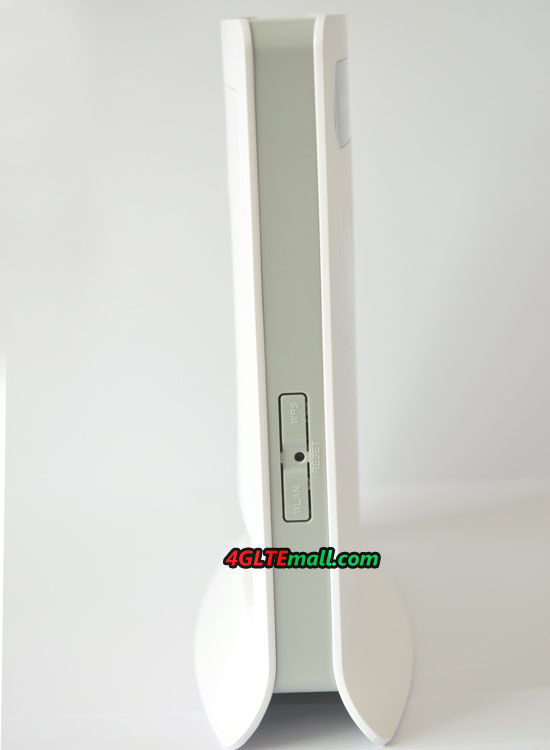
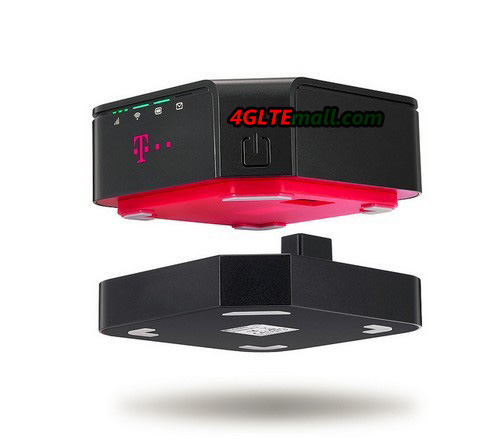
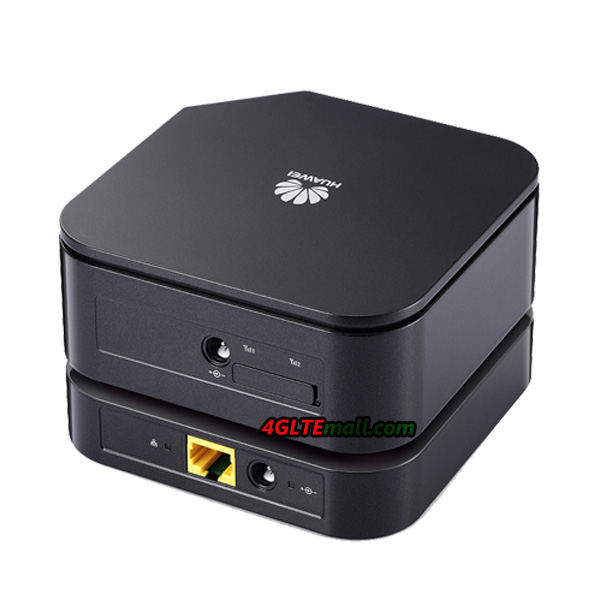
T-Mobile Home Net Box Huawei E5170s-22 basically consists of two parts: the actual router with integrated modem and the wireless module for up to 32 wireless devices, as well as a docking station that supplies the router with power and also has an Ethernet LAN interface.


A special feature is the built-in battery in the T-Mobile Home Net box. This enables wireless operation without docking station for up to 2.5 hours, just as you would expect the E5170 working as a 4G router. The operation is normally via a web interface, so the browser of any terminal is possible. The configuration via the Huawei Mobile WiFi app is also possible.

Fast modem with LTE

As we can see, there is a “s-22” in the model number, Huawei ‘s subsidiary HiSilicon chipset is integrated inside the Huawei E5170s-22 modem. This supports cellular standards GSM, UMTS and LTE. In the fourth generation, wireless network connection of up to 150 Mbit/s for the downlink and up to 50 Mbit/s for the uplink are possible because of the LTE Category 4 can be used . Over UMTS, the maximum downlink speed of 42.2 Mbit/s are achievable, provided the network with DC-HSPA+ is equipped.


If the reception is poor, two external antenna connectors are ready for LTE or UMTS external antennas to be connected. The connection would be much helpful for computers, tablets and other devices via Wi-Fi 802.11 b/g/n and the surfing speed could reach up to 300 Mbit/s, unfortunately, neither the 5 GHz band, nor the fast Gigabit 802.11ac Wi-Fi is supported.

We believe the HUAWEI E5170 is not introduced by only T-mobile Austria; the 4G LTE Cat4 Router E5170 would be in many operators’ product range.

HUAWEI B683 3G Router Setup Guide for Network Connection

Huawei B683 Setup Introduction 

This guide explains how to setup your HUAWEI B683 3G router with the ability to share the Internet connection among multiple computers. Once you have completed the instructions, the router can log onto the internet and you will be able to connect your computers wirelessly to the router.

Log in to the router’s control panel. Open a web browser and open the following address: http://192.168.1.1

Select the following:

User Name: admin

Password: admin

Click on “Login”.

Enter your PIN, click “Connection” in the control panel’s left side

Enter the PIN code, which is printed on the plastic card where the SIM card was sitting. The “Save PIN Code” can advantageously be selected, otherwise you need to log in to your router’s control panel and enter the PIN code every time if the router has been disconnected.

Not all models support this feature. In this case, you can disable the PIN code on the SIM card (see description further along in the manual). Click “Apply”.


Set up the Internet connection and the internal wireless network

Click on the “Settings” at the top.
Click on the “Quick Setup” in the control panel’s left side.

Click the “Next” button to start the setup wizard.

Verify the following:
Profile Name: B683
Dial-up Number: *99 #
User Name: <efterlades blank>
Password: <efterlades blank>
APN: Check to your SIM card provider and enter the APN here
IP Address: <Dynamic>

Click on the “Next” button.


(1) APN = Access Point Name Depending on which APN you choose, you have different visibility (IP address and ports available) compared to the rest of the Internet.

Other settings:
Authentication: CHAP+PAP
Connection Mode: Auto
Under Connection Mode can be selected “Manual”. With this option, you must log into the router’s control panel and connect the connection each time if the router has been disconnected.

Click on the “Next” button.


Select the following:

Name (SSID): The name of the B683 router’s wireless local area networks (2)
SSID Broadcast: Enabled (3)

Click on the “Next” button.

(2) To be selected on all the computers that will be connected to the Huawei B683 wirelessly.
(3) The B683 is visible in a radius up to 100 meters.


Select the following:

Encryption Mode: WPA2-PSK
WPA Encryption: AES + TKIP
WPA Pre-Shared Key: code of your choice (4)

Click on the “Next” button.

Review your selections and exit the wizard by clicking “Finish”.

The router now connects to the Internet and you can continue the installation on your computers with wired (LAN) or wireless (WLAN).


(4) Wireless key must be entered on each computer and then connect to the router wirelessly.

Changing the WiFi code of HUAWEI B683


To change the WiFi code on your HUAWEI B683, start by opening your internet browser, you can uses Internet Explorer to show how to do.


Step 1:  Enter “http://192.168.1.1” in the address field


Step 2: Login and enter “admin” into the password


Step 3: Locate the “Settings”


Step 4: Find “WLAN” and “WLAN Basic Settings”


Step 5: In the “WPA Pre-Shared Key”, enter your new personal code and press “Save Settings” at the bottom

HUAWEI E5372 Mobile 4G Router Review

Following the LTE-Advanced network available in Germany, more and more LTE Category 4 Mobile devices are presented to public by the operators. Now the Huawei E5372 LTE Mobile Hotspot will be available soon. We are lucky to have the opportunity to have a closer look of the Huawei E5372. Today, we will have a overview of this new LTE mobile hotspot.


LTE Category 4 to 150 Mbit/s
As a modern LTE hotspot, Huawei E5372 supports LTE Category 4 based on the latest LTE standard with up to 150 megabits per second downstream and up to 50 Mbit/s upload. The HUAWEI E5372, more accurately model number is E5372s-32, supports the LTE Frequency bands at 800/900/1800/2100/2600 MHz, which are the most popular LTE bands in Europe and Asia. So with the unlocked HUAWEI E5372, user can surf and roam in most of the LTE networks over the world. As the backup, the HUAWEI E5372 could work on UMTS/HSPA+/GSM networks where LTE network is not available. Based on the DC-HSPA+ technology, the 3G Peak download speed could reach up to 42.2 Mbit/s.


Wi-Fi for up to 11 devices
With the built-in WiFi 802.11b/g/n module, HUAWEI E5372 could support maximum downstream speed up to 300 MBit/s. A special feature compared to HUAWEI E5776 is that Huawei E5372 can not only transmit on 2.4 GHz, but also supports the 5 GHz band. This is especially useful when there are many other networks are already active in the 2.4 GHz band. Like other 4G Mobile WiFi Hotspot, up to 10 WiFi devices can be connected wirelessly through Huawei E5372. It is also possible to connect to the Internet via the microUSB connector. Therefore, up to 11 devices can surf simultaneously via the E5372 LTE hotspot.


Up to 6 hours operating time
unfortunately, the replaceable battery is 1780 mAh, which is somewhat smaller than most other MiFi hotspots. Huawei E5372 is the smallest LTE hotspot on the market. And two connectors for external antennas are available in HUAWEI E5372, while HUAWEI E5776 has only one antenna connector. The MIMO antenna technology could be used with two external antennas, one antenna can’t do the MIMO.


Same model as Vodafone R215
The Huawei E5372 LTE hotspot will be marketed with other operators’ brand; as we know, Vodafone has introduced E5372 in its product range. The new router is named Vodafone R215 and will be available in the next few weeks. And the color of R215 is in black. Other features may be the same. Per the user experience, the unlocked one or HUAWEI original one would be more convenient to roam around and support more operators.

HUAWEI E5372 4G Mobile WiFi Hotspot Test

Since we get the Huawei E5372 recently, we have another 4G mobile router in the test now. The Huawei E5372 is the little brother of the successful Huawei E5776 4G Mobile WiFi, and offers some improvements technically compared to other models tested before. The improvements includes, for example, supporting Wi-Fi in the 5 GHz range and a repeater function. The Huawei E5372 modem is already known by many operators: it offers 2G GSM, 3G UMTS and 4G LTE (Category 4 of up to 150 megabits per second for download). Huawei E5372 is a quite cheap LTE Category 4 Hotspot, even cheaper than the Vodafone branding model (the name is Vodafone R215). Now you can get the HUAWEI E5372 on 4gltemall.com .


The Huawei E5372 4G Router comes in a small cardboard box, which itself contains a micro USB cable and a quick guide next to the device. The E5372 can get power supply directly from the USB cable when connecting it with PC, or use a power adapter to charge power. However, the capacity of 1780 mAh battery is really disappointing when most of the 4G mobile hotspots are using battery of more than 3000mAh currently.


The first impression of Huawei E5372 is good. The optional white or black plastic is dull and does not attract fingerprints, the weight is 130 grams and the dimensions are quite pleasant with a 99 mm x 62 mm x 14 mm, which is very compact for an LTE-capable device. On the front, a small OLED display is placed, which displays all the important information and also allows certain settings in combination with the power button and the side menu button.

Manufacturer: Huawei
Model Name E5372 (E5372s-32)
Technologies LTE (4G) UMTS (3G) GSM (2G)
Frequencies * 4G LTE: 800/900/1800/2100/2600MHz* 3G UMTS: 850/900/1900/2100 MHz

* 2G GSM: 850/900/1800/1900 Mhz

Maximum speeds * LTE: 150 Mbit/s down, 50Mbit/s up* UMTS: 42.2 Mbit/s down, 5.76 Mb/s up (when using DC-HSPA+)

* GSM: 384 kbit/s (when using EDGE )

Wireless * 802.11b/g/n up to 300 Mbit/s* 2 × 2 MIMO

* both 2.4 GHz and 5 GHz repeater mode

Chip & Software * Chipset: HiSilicon V7R1 with Balong710 modem* firmware version: 21.221.19.00.00

* Software Version: 13.100.06.00.03

Other Features * MicroSD slot up to 32 GB* 2x External antenna connector( type TS-9 )

* display 128 × 128 pixels

* Removable Battery 1780mAh


Also on the side, there are two antenna connectors of type TS-9, so the Huawei E5372 is the first LTE Category 4 mobile Wi-Fi router with external antennas to be fully compatible 2 x 2 MIMO data transmission. Also a MicroSD slot for memory cards of up to 32GB is installed at the side of SIM card slot. Unlike HUAWEI E5776, the battery of HUAWEI E5372 is removable, user need to insert SIM card and cover the battery, then the device is working. Someone may ask where to buy HUAWEI E5372 Antenna, actually, we have already 4G LTE antenna (TS-9) from HUAWEI available on 4gltemall.com .


Huawei AF23 Surf stick Dock/Router Test

After a long time, HUAWEI offered a new router again– the AF23, which can help a number of users to surf the Internet with Huawei 3G & 4G surf sticks via LAN or WLAN. Huawei AF23 has no built-in modem, so it must operate with a USB surf stick. We must pay attention to the highest possible speed of the HUAWEI AF23: the amazingly small router provides speeds of up to 300 Mbit/s over Wi-Fi and it’s also suitable for excellent Huawei E3276 LTE sticks.

Included a USB cable and a power adaptor, Huawei AF23 is not expensive as a wireless router. Huawei AF23 is not integrated with a battery which keeps the price low, but the HUAWEI AF23 can’t work as mobile 4G router like HUAWEI E5776. So it’s better to use the HUAWEI AF23 as a stationary router. The English Short Guide describes the basic features, no further information is provided.


Huawei AF23 supports two modes of operation:


  1. Work as pure access point with the DSL or cable connection via WAN port on the back
  2. Operation with USB surf sticks to access the wireless Internet


Normally, it’s easy to let HUAWEI AF23 working as 4G wireless router if you have a 4G Surfstick: simply plug a Huawei surf stick into the router, wait a few seconds and then you can connect via LAN or WLAN to the internet. The APN will be entered only in rare cases, most SIM card and network provider are detected automatically. If some adjustments are necessary, user can enter the web UI (192.168.8.1) in the browser and change the parameter accordingly.

Like other routers, Huawei AF23 LTE Sharing dock also shows the important information such as the data consumption and reception strength about the mobile Internet. But the exact radio technology (only 2G, 3G or 4G) cannot be seen through this router. Nevertheless, the usual settings about the encryption can be made, and also an FTP server can be configured when using a memory card to the USB port instead of a surf stick.


The speeds of Huawei AF23 are amazing and convincing in every respect. This is evident for connecting to the internet: after 20-25 seconds, the router is connected to the Internet. Wherever many networks are available, HUAWEI AF23 will always choose the fastest network.  In the test with Huawei E3276, the Vodafone LTE network was connected in almost 20 seconds. At the same time, we test with the Huawei E3331, which takes only took a little longer to connect to the Telekom UMTS network. The integrated Wi-Fi module, unfortunately only works in the 2.4 GHz band and abandoned the use of the 5 GHz range. For the use of LTE Category 3, the almost perfect downlink speed could reach up to 90 Mbit/s in my test under Deutsche Telekom LTE network. But when working with AF23, the speed could up to 300Mbps via WiFi.


The range of the wireless network from HUAWEI AF23 could cover around 50meters, which is suitable for a small house or a bigger apartment with thick walls. LEDs on the AF23 dock router indicate the current operating status, so users can have a quick glance whether the device is connected to the Internet and working normally.

All in all, Huawei AF23 is a good WiFi router. The unit does exactly what it should do: to provide the Internet connection with a USB surfstick to support multiple devices quickly and easily surf. There are no compatibility issues there: all Huawei surf sticks manufactured since middle of 2009 are supported, future models can easily be added via firmware update.

Huawei E3531 New 3G Hilink USB Stick Available

On September 8th, 2013, A Surf Stick from HUAWEI comes to our eyes with white color. The model number is HUAWEI E3531. As a global leading provider of information and communication equipments, HUAWEI has release various 3G wireless USB stick with better and better technology and performance. Huawei E3531 is another model ease of use through plug and play, and supports mobile Internet with HSPA+ speed up to 21mbps.

Connects in few seconds without setup


If you have a wireless USB Stick, it’s better to quickly and easily connect with a desktop, laptop or Ultrabook and surf the Internet in high speed. The powerful HUAWEI E3531 is exactly this kind of USB Stick. Without driver installation, the HiLink technology in HUAWEI E3531 ensures an Internet connection in less than 15 seconds. The surf stick is simply plugged into the USB port of your notebook or PC and go. The small weight of only 30 grams and 84 x 27 x 10.5 mm size offers surfing fun for Windows ® XP, Windows ® Vista, Windows ® 7 and Windows ® 8; For the connection, HUAWEI E3531 could work on 3G (UMTS ) with HSPA+ up to 21 Mbit/s and 2G ( GSM, GPRS and EDGE). The 3G Supported UMTS frequency bands are 900 and 2100 MHz and 1900/1800/900/850 MHz for 2G. The multi-colored LED display shows the current status of the reliable connection.

“The Huawei E3531 is a surf stick that is ready for use through plug and play in a few seconds. We offer our customers a product available that can go on the road with the fast, reliable and easily online, “says Lars-Christian Weisswange, executive vice president of the Consumer Business Group at Huawei Technologies. As the partner model of HUAWEI E3531, the HUAWEI E3131 is one of the best sellers for 3G HSPA+ 21Mbps USB Stick.


However, this is not the end, here now we also get the unlocked Hilink USB Stick for DC-HSPA+ 42Mbps: HUAWEI E3251. It’s the fastest 3G USB Stick now with the best design. If you want to high speed and better surfing experience, HUAWEI E3251 would be considerable. Anyhow, HUAWEI USB Sticks are a series of reliable Surf stick on the go.

Vodafone R215 4G Mobile WiFi Hotspot Review

Vodafone R215 LTE Mobile Wi-Fi Router is the successor to the Vodafone R210 router. The device is manufactured by Huawei and again technically similar to the Huawei E5372 4G LTE Category 4 Mobile Hotspot, where Vodafone has naturally customized not only the exterior but also the firmware. Vodafone R215 Mobile Wi-Fi hotspot is a new LTE Category 4 Mobile Router, which allows data rates of up to 150 megabits per second for downstream and up to 50 Mbit/s for upstream. All three LTE Frequency bands used in Germany (800, 1800 and 2600 MHz) are supported.


Replaceable battery and memory card
Just like almost of the LTE surf sticks, the R215 mobile Wi-Fi router can be common to insert a microSD memory card. The data stored on it could be shared to all devices that are connected to the hotspot R215 under request. Compared to other Vodafone LTE hotspot, Vodafone R215 has a special feature; it is the removable battery that can be replaced quickly. The R210’s battery can’t be removed or replaced. Unfortunately, the capacity of 1780 mAh is not very high, which can keep continuously operating up to 6 hours.


Technically speaking, a modem chipset of Huawei subsidiary HiSilicon is included in the Vodafone R215, which not only supports LTE with up to 150 Mbit/s, but also works on DC-HSPA+ network in the UMTS, and the EDGE/GSM network are backward. If the Vodafone R215 is working in areas with poor reception, user can be strengthen the signal through two external 4G antennas; through the two ports, the R215 Hotspot will even support MIMO in LTE network.


The Vodafone R215 LTE hotspot router will come soon in Germany on the market; the prices are not yet known. But if you like HUAWEI brand, it would be better to take HUAWEI E5372, the E5372 is SIM unlocked and would support most of 4G networks and 4G operators in Europe and Asia. Here now, the HUAWEI E5372 is available on www.4gltemall.com . If you can’t wait to enjoy the 4G 150Mbps, HUAWEI E5372 is a one of the great hotspot for you.


How to Unlock Netgear Aircard 340u

If you have a locked Netgear Aircard 340U, when your plug other carriers’ SIM card, the Aircard Watcher will show the error message “incorrect SIM”. So if you want to use with other carriers’ SIM card, you’d better to unlock it. But most of users don’t know how to unlock it. Below are the two methods to unlock the Aircard 340U. One is free but the order is not free.


Method 1: – Not free

  1. Download the DC-unlocker from here: https://www.dc-unlocker.com/downloads/get/FwREimE3 and install it on your PC
  2. Plug the locked Aircard 340U to your PC and run the Dc-unlocker to detect it
  3. Create an account in the DC-unlocker and unlock it


However, the unlock service is not free, and user need buy credits to unlock the Aircard 340u. This is the fastest way to unlock Aircard 340U. But if you don’t want to pay for the unlock service. You can follow below the method to unlock it.


Method 2: — Free


1. Plug your Aircard 340u to your PC and install the Aircard Watcher.

2. Contact your service provider and request the MEP code (8 digit number) for the AirCard. Only the provider that the device is locked to can provide the MEP code. Insert a SIM card from a different service provider, plug in your AirCard and open AirCard Watcher. The MEP Locked dialog box will open.

3. Enter the MEP code (8 digit number) into the text box and click Send.

4. The message ‘Pin verified’ will be displayed on the Watcher status section if the correct MEP has been sent.  Please note the SIM will become permanently locked if more than 5 incorrect attempts are sent.

5. Once the PIN has been verified, the new SIM will be detected and your Aircard 340u will be able to connect to the carrier network.


Difference Between HUAWEI E5776 and E5372

With the 4G LTE network development, more and more 4G LTE Category 4 devices are available. HUAWEI is always leading the mainstream of LTE trend. And more and more Huawei wireless devices are available. Today, we will have a look at the Huawei E5776 and Huawei E5372 4G mobile WiFi hotspot, the two very powerful mobile and wireless routers. They are both available on the 4gltemall.com now.

You may wonder where the exact advantages and disadvantages of each device are, you will see the details in following article. A common feature is the integrated cellular modem: both the HUAWEI E5776 and the HUAWEI E5372 is based on HiSilicon Hi6920 chipset which is for the LTE Category 4 with up to 150 MBit/s download speed. In addition, the modem is backward compatible with UMTS DC-HSPA+ technology and including GSM/EDGE.


Differences 

As we can see, the Huawei E5776 is in black color and made of plastic, but in China, the model HUAWEI E5776 is in white; and you can also see the Huawei E5372 is either black or white appearance, and with removable battery. This has some advantages, but the capacity of the E5372 battery is only 1780 mAh, which seems too much lower compared to 3000 mAh of HUAWEI E5776. This becomes apparent in the operating time: Huawei E5776 provides up to 10 hours of wireless Internet access, about 4 hours more than the E5372.

As the table shows, there is another difference: the Huawei E5372 wireless module transmits as desired in either the 2.4 GHz band or the 5 GHz range. Especially for large events with dozens of Wi-Fi networks so you have an advantage with the E5372, because the terminals of course also support the 5 GHz band. Furthermore, a repeater mode has been integrated in the E5372, so you can also use a different wireless network for Internet access when needed. Both devices have a limitation of connecting up to 10 WiFi users, in addition, an eleventh device can access the Internet with the MiFi router via USB cable.

Model Huawei E5776 Huawei E5372
LTE Network Category 4, 150 Mbit/s for Dowload and 50 Mbit/s for Upload.Frequency: 800/900/1800/2100/2600 MHz
UMTS DC-HSPA+ up to 42.2 Mbit/s for Download und 5.76 Mbit/s for Upload.Frequency: 850/900/1900/2100 MHz
GSM/ EDGE Frequency: 850/900/1800/1900 MHz
WLAN 802.11 b/g/n, 2×2 MIMO, up to 300 Mbit/s (2,4 GHz) 802.11 a/b/g/n, 2X2 MIMO, up to 300 Mbit/s (2,4 or 5 GHz), Repeater model available
Battery Inserted battery, 3000 mAh, working for  10 hours Removable battery, 1780 mAh, up to 6 hours working time
Interfaces Micro USB, Micro SD, 1 external Antenna( TS-9 connector) Micro USB, Micro SD, 2 external Antenna (TS-9 connector)
Dimensions and weight 107 x 66 x 16 mm, 160 g 99 x 62 x 14 mm, 130 g
Release In Quarter 4. 2012 In Quarter 4. 2013


For users who usually use their mobile LTE router in stationary, an external antenna can be useful. Here is important to note that only the Huawei E5372 has the necessary connections for the two MIMO technologies. The Huawei E5776 only has one TS-9 connector and is suitable only for UMTS antennas.

Conclusion

You decide which device ultimately, is a matter of taste. The Huawei E5776 has the advantage of significantly more powerful battery while the Huawei E5372 is technically more powerful in data transmission. At the main component, i.e. the modem, but both devices are absolutely equivalent and well equipped for the future.

More detailed information on the two devices you can get in the next article about test for the Huawei E5776 and Huawei E5372. Good to know: the Huawei E5776 mini is also available as a telecom Speedbox LTE, it costs a little less, but also slightly different frequency bands. Also the Huawei E5372 is cheaper available under a different name: Vodafone sold the unit from the 4th Quarter of 2013 under the name of R215 in its stores, also the frequency bands differ marginally from the original device.