TP-LINK M7350 4G LTE Router Test

Every month, there are new models of 4G mobile routers available on the market. It is an interesting proposition especially in summer when we choose to have a vacation in different places. The mobile hotspot may not be necessary where there is access to a WiFi network. Everyone has a smartphone or tablet today and would like to use it even during the summer tour. However, if you want to save power for the phone, a 4G mobile router may be necessary. The router supports 4G LTE will provide quick internet access for several mobile devices. Such a device is TP-LINK M7350, which will tell you today.

TP-LINK M7350

The TP-Link M7350 router looks elegant. A small, rectangular design can be mistaken with a smartphone from a distance. Especially, the M7350 router is black. On the upper surface mounted display – it is not large, only 1.4 inch, but it is sufficient to provide information on the calls, battery status, and of course the menu. Under the display power button, it is shaped in such a way that it was easy to find it without looking at the router. On the top edge placed the start button menu, while the bottom has a microUSB port, by which the device can be charged.

TP-LINK M7350
TP-LINK M7350

As I mentioned, TP-Link M7350 router supports 4G LTE, and it have a memory card slot. Since it is a portable device, it’s also equipped with a battery. We will find them under the bottom cover. Unfortunately, the design is not very good, which will easily remove the cover. You have to gently pry and then we choose the battery, SIM card slot, and microSD card slot. The battery has a capacity of 2,550 mAh and can therefore provide a long service life for the router.

TP-link M7350 is lightweight and small size, which allows put it into the pocket without problems (unless you walk in tight jeans). The body material is made of good quality. I would prefer, however, the memory card slot was drawn out. If we want to change the memory card, we must remove the battery and disconnect the network. If a socket placed on the side, we could do it without interrupting operation. Of course, this is only useful if you frequently change (or want to change) memory card.

TP-LINK M7350
TP-LINK M7350

Check below the TP-Link M7350 Mobile Hotspot Features:

HARDWARE FEATURES
Network type FDD-LTE Cat4 (800/900/1800/2100/2600MHz)
DC-HSP + / HSPA / UMTS (900 / 2100MHz)
EDGE / GPRS / GSM (850/900/1800 / 1900MHz)
Ports 1 micro USB port to charge the device battery
slot for a SIM card
slot for Micro SD card
Buttons Switch
Menu Button
Antenna Inside
Transmission speed Getting up to 150Mbit/s
send up to 50Mbit/s
Power Built-in rechargeable battery 2550mAh
Dimensions (W x D x H) 106 × 66 × 16mm (4.2 × 2.6 × 0.6 inches)
Micro SD card reader up to 32 GB
Display Statistics data, the state of Wi-Fi network, number of users, the type of network (2G / 3G / 4G), signal strength, access to the Internet, the battery meter.


PROPERTIES AIRTIME
WiFi Frequency 2.4GHz and 5GHz
wireless standards IEEE 802.11a, IEEE 802.11b, IEEE 802.11g, IEEE 802.11n
EIRP <20dBm
Security of wireless transmission Hiding the SSID, MAC address filtering, encryption, WPA-PSK / WPA2-PSK
DHCP DHCP server, DHCP client list


OTHER
Certifications CE, RoHS
Contents of the package Portable hotspot M7350, LTE-Advanced
Micro USB cable
adapter Micro SIM> Standard SIM
Adapter Nano SIM> SIM Standard
Power
Installation
System requirements Windows 8/7 / Vista / XP, Mac OS, Android, iOS, Windows Phone


As you can see, the M7350 router does not support the latest standard 802.11ac, but allows you to work in the 2.4GHz or 5GHz network. It is very important that the first frequency is very popular, and in addition has a small number of channels, which can sometimes cause problems with coverage, interference, etc.. Of course, the main advantage is its support for 4G LTE networks and it could supports almost all the LTE networks in Europe and most carriers in Aisa. And up to 15 wireless devices could connect to TP-Link M7350 mobile 4G router.

TP-LINK M7350
TP-LINK M7350

And the higher speed transmission on 4G LTE network is also attractive. Based on LTE Cat5, TP-Link M7350 can achieve download speed to 150mbps and upload speed to 50Mbps. And 3G DC-HSPA+ and 2G GSM networks are backward compatible. If the 4G LTE network is not available, the router would automatically switch to 3G or 2G network. But before turning to the use and performance, one more feature should be remarked. I mentioned earlier that the router does not support the 802.11 ac. Why we are concerning on this feature, you should look at a table below:

Standard Transmission speed
802.11 n Getting to 150 Mbit/s
802.11 ac Downloading up to 500 Mbit/s
4G LTE Downloading up to 100 Mbit/s

Source: Wikipedia

TP-LINK M7350


As you can see “n” is enough to cover the demand on the transmission, and 4G technology is available at high speed. Of course you can argue that this is the theoretical speed, in extreme cases 4G may be faster than the WiFi. We still think the “AC” feature is very important for future.


Starting the TP-link M7350 router is very simple. After placing the SIM card in the device, simply press the power button. After a few seconds, the system will work, some may take longer to log on to the GSM network. WiFi connection is very simple – just select the appropriate option in the menu and all the information needed – SSID and security key to connect to the network, which will be displayed on the screen. Then you only need a browser, enter the corresponding IP address, enter your login and password (the default is admin / admin) and can do all the settings for the router.

tp-link-m7350-web-ui-settings-1

Interface prepared by the manufacturer is very simple. In the upper part, there is a bar, which is equipped with icons that quickly inform us about the state of the battery, received SMS, connected devices, etc. Following are the main menu consists of four positions: Wizard, Status, SMS and Advanced. With their help, we can run the setup wizard, check the status of calls and statistics, see SMS and … ultimately configure the router. When selected, on the left it will display a new menu, which allows you to set network security, DHCP, restore factory settings, etc.

tp-link-m7350-web-ui-settings-2

Tests conducted using a SIM card with the Vodafone network. The wireless connection listed the notebook Dell Vostro. Below I present the results of measurements, but notes that the result may be different from other places. The link speed depends on the level of the network in place in which to combine. And the distance between users and the M7350 Router, the speed also varies. The farther you move away from the router, the transmission speed will be lower. Throughput tested by sending files with 1GB and 4GB. The achieved results presented in high speed on LTE network.

tp-link-m7350-web-ui-settings-3

As you can see, the results achieved are not bad. Compared to stationary routers that have external antennas offering improved efficiency in promoting and receiving radio waves, TP-link M7350 mobile router performed not quite bad, especially in the short run, and it performs better than 4G USB modems with whom I had so far to deal with.


When testing the performance, we connect the M7350 router with mentioned the notebook, two Samsung smartphones (Galaxy S6 and Galaxy S5) and two Huawei new smartphones (Huawei Nova and Honor V8) through WiFi. For all devices I browsed the Internet, download files, and I played video on YouTube. I did not notice any special delays. The tests I conducted both in the open areas and in the rooms. In any case, I had a stable connection.

tp-link-m7350-web-ui-settings-4

At the end, we note just the battery. As I have written before the battery has a capacity of 2550 mAh, which is quite a few. Since 4G is faster standard, users have great demand for a larger battery. Many other TP-Link’s competitors in China had presents the new 4G pocket WiFi with very power capacity, the new pocket WiFi can even charge other electronics, which is very very attractive and useful feature. The typical models include Huawei E5770 Mobile WiFi Pro, Huawei E5771 MiFi Plus and ZTE MF903 Mobile Router etc..

tp-link-m7350-web-ui-settings-8

Summary

TP-LINK M7350 is a good 4G mobile router, which it is worth to obtain. It is true that it is not cheap, but will provide fast transmission speed as the manufacturer promised. Simple connection to the network, a simple menu, simple and fast interface, all this translates into a simple operation. It could be a good partner for business trip or outdoor activities!


Huawei E5377 4G Mobile Hotspot Test

Mobile routers are now very fashionable. It is true that we can connect to the network using smartphones and tablets, however, there are still many users who having computers would like to use mobile routers to connect to the Internet. Since many users expect more from the mobile routers, the manufacturers of mobile routers supplied new models with new functions. Huawei E5377 4G hotspot is one of them.

huawei-e5377-3

The Huawei E5377 router is a real pocket router. The manufacturer has equipped it a LED display, and next to LED display on the right side is a big switch. The top edge of the body is the menu button, while at the bottom microUSB slot and two antenna connectors covered flap are placed. Remove the rear cover, plug in a valid SIM card and insert the battery. Then we can get connected with internet.

huawei-e5377-4

The Huawei E5377 hotspot is very light and fits comfortably in your hand. The body has a special groove that facilitates its opening. The whole is well matched; there are no gaps, no creaks. The white color looks elegant, but I have a feeling that quickly loses its charm after a few trips in your pocket. Unfortunately, the white body gets dirty easily turning to gray. Especially since the material used is rough, making it easier to absorb dust and pollen. I personally like the black color, which is also recommended by Huawei.

huawei-e5377-6

As can be seen, Huawei E5377 router can handle both 3G and LTE. The difference between these technologies laid primarily in the transfer data rates. In the case of LTE, the speed can be several times higher than in the 3G (LTE, currently can achieve up to 55 ~ 85Mbps), the theoretical standard specification provides for even more than double the download speed to 150Mbps. The E5377 router can install a memory card of up to 32GB. This way we can use it, for example. As a memory stick, the contents of which we can share with other users. And maximum of 10 users could get connected with the E5377 hotspot through WiFi. The equipped battery in E5377 already wrote. The manufacturer says that it is sufficient for 6 hours operation. Reading the rest of the text, you will find out how the E5377 performs.

huawei-e5377-7

Let’s see the user interface. The Huawei E5377 router can be setup in two ways: through the menu and the power buttons on the wireless router, or through the Web browser. The latter method (or browser) is definitely easier to use while offering more options, which is recommended. Just run the router, enter the password for the network (the default SSID is HUAWEI-E5377-XXX) that are on the label under the battery, enter the address into your browser: 192.168.8.1 … and that’s it. You can also download the Huawei Mobile WiFi APP for Android or iOS to setup the Huawei E5377 Router.

huawei-e5377-8

The interface is very easy to use, although I admit that it could work a little faster. Some pages refresh slowly, but enough to do common settings. The application is very simple, and consists of a main menu in the upper part of the window, pop-up menu on the left and the main window where you set the individual parameters. The launch window is equipped with three large buttons, which can enable or disable the router, stop cellular data transmission, and enable/disable WiFi. At any time by selecting Statistics, you can check the amount of data sent and received, check out who is connected to the network, etc. Prepared menu also allows you to send and read SMS messages.

huawei-e5377-1

The most important item on the menu are the Settings. This is where you configure network access, sharing WiFi, Ethernet settings (one can use the USB – LAN), etc.. The manufacturer has not forgotten the safety at different levels, we can verify your MAC Address, IP, etc. There are of course several custom functions such as the ability to prioritize users, the ability to define a virtual server. We also have a NAT, UPnP, DMZ … if you think this is not enough, but we need not everything if we use the router as a temporary Internet source during a weekend trip out of town. Actually, I would like to recommend use the main stationary router access to the network at home rather huawei E5377.

huawei-e5377-2

The already mentioned Menu and Power buttons also enable us to navigate through it – to select various options and approve them. Using this software, we can switch the operation of the device mode 2.4GHz to 5 GHz. We can also check the settings of the wireless network, such as its SSID, password and IP address of the router, you can start the WPS function and set E5377 to the operation extender whether to enable or disable data roaming. We also have the ability to reset the router. What interesting is the ability to display 2D code (QR Code), with which we can quickly enter the security code network, or run applications that allows device management from a smartphone equipped with Android system. The menu is simple, fast, and easy to understand and do settings.

huawei-e5377-5

Summary
Huawei E5377 looks elegant, fits in your pocket, and is easy to use. Here now there are many new successors available with better technologies such as Huawei E5786 or Huawei E5787. If you don’t have high demand for the pocket WiFi, huawei E5377 is recommend as a budget mobile partner!
Huawei Honor 8 New Smartphone Available

At an event in Paris a few days ago, Huawei launched its new flagship smartphone Honor 8 for the European market. The predecessor Honor 7 has good price-performance ratio and is now available at good price now in www.4gltemall.com. The Honor 8 was sold in China for several weeks. Highlights of the new Honor 8 include the completely new design with 2.5D glass both on the front and on the back, and the 12-megapixel dual camera, which is already known in the Huawei P9.


huawei-honor-8-3

New design with lots of glass

The Honor 7 was still a massive metal back and a flat glass display cover on the market. The successor Honor 8 provides glass surface on both sides, which is toward slightly rounded at the sides. Thus, the device is expected to be better in the hand and no more act as edgy. The frame is further comprised of metal.


The Honor 8 is available in the colors Midnight Black, Pearl White and Sapphire Blue. All three colors are both on the front and on the back side visible and also the frame is colored accordingly, so that one has a uniform appearance.

huawei-honor-8-1


Good equipment

The Honor 8 is quite similar to the Huawei P9 technically. Most likely is that visible on the rear dual camera, this has resolution of 12 megapixels and allow good shots particularly. One sensor is an ordinary RGB color sensor; the other is a monochrome sensor.


Again on board is the dual SIM function and the ability to expand the internal 32GB memory with a MicroSD memory card. As a processor, HiSilicon Kirin 950 octa-core is used, which runs at up to 2.3GHz per core and is equipped with 4 GB of memory. There is also an i5 coprocessor, which provides, in certain applications for acceleration. The Wi-Fi works on both 2.4 GHz and 5 GHz, and besides GSM and UMTS, Honor 8 supports LTE networks.

huawei-honor-8-2

The LCD display of Honor 8 is 5.2 inches and has a resolution of 1920 x 1080 pixels (Full HD). And a fast fingerprint sensor on the back has been integrated again. Another new feature is the NFC functionality, even if a Secure Element for secure payments sadly lacking. The integrated battery is 3,000 mAh strong. The Honor 8 can charge to 50% within 30 minutes via the integrated USB Type C port.


huawei-honor-8-4

The Honor 8 is available on www.4gltemall.com now. As a new mobile phone with new features, it is significantly more expensive than the Honor 7.However, the price-performance ratio is very good if you compare the specifications of Honor 8 with those of similar expensive competing products.


Huawei E5377 4G LTE Mobile Hotspot Review

Some years after the launch of LTE, there is already a wide range of mobile LTE routers with integrated battery. Especially the Chinese manufacturer Huawei, who is clearly the market leader in this segment, offered many models. But not every user requires the best and most expensive equipment, therefore the Huawei E5377 is now a very compact, lightweight mobile LTE hotspot available, which is still very good technical equipment.

Huawei E5377

Smaller and lighter 4G hotspot

Weighing approximately 80 grams, the Huawei E5377 is very light and is very good in the hand or transported in a pocket. With long time use, it becomes quite warm, but the operating temperature is always at an appropriate level.

On the front of the Huawei E5377, between the Huawei logo and the power button, there is a square display, where a variety of information such as reception, network technology, the spent data volume are shown clearly. The display is not permanently lit to save energy, it only turns on when you press the power button or a wireless device is connected.  Furthermore, you can find a menu button on the top edge, with which you can make a few settings in combination with the power button. Thus, for example the ability to display a QR code through which smartphones or tablets enter into the App Store by scanning the code. There Huawei HiLink app can be downloaded. With this app, further adjustments can be done to the E5377, such as change the wireless network name or password.

Huawei E5377

Special feature: wireless repeater

In addition to the controller via the Huawei HiLink app, an access to the Huawei E5377 via any browser is possible. The default IP is 192.168.8.1. The web interface responds quickly and provides the most important settings. A special feature is the wireless repeater function, with which you will be able to log the Huawei E5377 into an existing wireless network and this order can be used as an Internet access. The advantage of this solution is, for example, that you can save data volume in mobile network as soon as you use the repeater.

huawei-e5377-mifi-indicators

Fast LTE to 150 Mbit/s

The integrated modem in Huawei E5377 supports the three wireless standards GSM (2G), UMTS (3G) and LTE (4G). Depending on the wireless technology, different speeds are possible. So LTE category 4 up to 150 Mbit/s downstream and 50 Mbit/s upload speeds are possible. In the UMTS network, speeds are up to 42.2 Mbit/s accessible via DC-HSPA+. Good to know: The Huawei E5377 router is compatible with all major European LTE frequency bands and supports quad-band GSM and dual-band UMTS in many countries for worldwide use.

Huawei E5377

The reception is good both in the LTE network and the UMTS network. Even in weak regions, you can often surf more easily with the E5377. You’d better put the E5377 router close to the window or even outdoors, because there the reception is usually best. By the way, there are two connections for external antennas; you can amplify the reception with an external LTE antenna, thus increasing its speed. The important thing is that the antenna cable has plugs type TS-9. These adapters are often called “pigtail” and are available in all good electronics stores.

huawei-e5377-usb-cable

WLAN at 2.4 and 5 GHz

A maximum of 10 devices can be connected with Huawei E5377 simultaneously via WLAN. Another device also can connect via USB. The wireless speed is up to 300 Mbit/s, on request, instead of the 2.4 GHz frequency band, WLAN in the region are running at 5 GHz. This is particularly appropriate when the 2.4 GHz band is overloaded or interference. The wireless frequency can be changed in the software of Huawei E5377. The WiFi range was very satisfactory in the test. The 2.4 GHz signal was still usable by two walls at a distance of about 8 meters. Unfortunately an external wireless LAN antenna cannot connect.

huawei-e5377-battery-and-back-cove

Up to 6 hours operating time with battery

The model battery of Huawei hotspot E5377 is easily replaceable by the user. It has a capacity of 1500 mAh and provides an operating time of about 6 hours. Unfortunately, no power adapter is included so that one is forced to connect the E5377 4G router to a USB port on the computer or on an existing USB power adapter. Compared to other devices, such as the Huawei E5786, the operating time is quite short – but it is possible to buy a second battery, thereby extending the duration.

huawei-e5377-qr-code

Conclusion

The Huawei E5377 has consistently convinced with good performance in the test. The Internet connection is very fast, the receive and transmit performance is good and the WLAN transmits on request at 5 GHz. Also very pleasant are the compact size and very low weight. Only the battery could be considered a point of criticism, as compared to other mobile wireless hotspots with large battery such as Huawei E5770 and E5771. The Huawei E5377 is now available at www.4gltemall.com. The unlocked version could be used worldwide without any limit.


Huawei E5787 4G LTE Hotspot Overview

The Huawei E5787 is a new modern LTE-Advanced hotspot with a large touchscreen display. The download speeds of up to 300 Mbit/s can be achieved, in the upload up to 50 Mbit/s are possible. The battery is easily replaceable by the user and has a term of up to 12 hours working time. With fast WLAN AC, Huawei E5787 hotspot can supply up to 10 devices simultaneously with an internet connection via USB cable.

Huawei E5787

Features and characteristics of Huawei E5787
Manufacturer and Model Number Huawei E5787 Mini Hotspot
chipset: Hisilicon | HPM Coretx A9 processor
LTE Category: CAT6
Download rate up to: 300 Mbit/s
Upload rate up to: 50 Mbit/s
Supported LTE bands: * LTE FDD Bands: 1/3/5/7/8/20 (800/850/900/1800/2100/2600MHz)

* LTE TDD Bands: 38/40/41 (2300/2500/2600MHz)

Backward compatible with: LTE CAT4 / DC-HSPA+ / UMTS / GSM
Support of LTE-Advanced: Yes
MIMO Support: 2×2
External Antenna: Dual TS-9 Connector for 4G/3G(Buy Huawei E5787 Antenna)
TelephonE
With integrated telephone system: No
Network | LAN & WLAN
LAN ports: No
WLAN standards: WLAN 802.11 b/g/n/ac
5 GHz WLAN support: Yes
encryption: WPS, WEP, WPA, WPA2
Wireless Internet Hotspot function: yes, support up to 10 devices/users
Others
Battery pack: 3000 mAh, exchangeable
Dimensions and weight: 109 x 58 x 7.5 mm at 155g
USB: MicroUSB
Memory card expansion: Micro SD
release: 2016
available at: www.4gltemall.com
Information material
Manual as PDF “Not yet available online


LTE Advanced with 300 MBit/s

The Huawei E5787 Hotspot is manufactured by the Chinese manufacturer Huawei and it provides a current LTE-Advanced CAT6 modem for up to 300 Mbit/s downstream and up to 50 Mbit/s upstream. It’s the second LTE cat6 mobile router from Huawei. The modem is manufactured by HiSilicon and also comes with the predecessor model Huawei E5786. Although the Netgear AirCard 810 is already a faster LTE hotspot, the Huawei E5787 is one of the fastest mobile LTE routers on the market.

huawei-e5787-e5787s-33a-mobile-wifi-touch-1

Most other devices provide only up to 150 Mbit/s in download (LTE CAT4). Of course the E5787 4G hotspot is also backward compatible with older wireless technologies GSM and UMTS (3G and 2G). In the UMTS network, up to 42.2 Mbit/s download via DC-HSPA+ is possible with GSM Data Accelerator EDGE is supported. Regarding the supporting frequency bands, we suppose the version for Europe FDD-LTE networks would be first available, ie. Supporting LTE band 1/3/7/8/20(800/900/1800/2100/2600MHz).


Easy operation with touch screen

Unlike its Huawei E5 predecessors, Huawei upgraded the screen on the Huawei E5787 because it has a large touchscreen display. So it’s also called Huawei E5787 Mobile WiFi Touch. Thus, the hotspot can quickly and easily use, which you already know and experience it from your smartphones ago. The key features like data consumption, connection time and receive status are displayed directly on the home screen. More detailed information you get on the menu that is graphically appealing. This feature was already available on Netgear Aircard 790s and 810s for long time. On this point, Huawei follows Netgear’s steps, but it should be the mainstream for high-level gadgets now.

huawei-e5787-e5787s-33a-mobile-wifi-touch-2


WLAN AC and Replaceable Battery

Compared to its predecessor Huawei E5786, Huawei E5787 has a removable battery. This has a capacity of 3000 mAh and will provide an operation time of approximately 12 hours. If there are many devices simultaneously connected, the capacity will probably be more likely to be slightly lower. The integrated WLAN radio module distributes the Internet connection of various devices such as laptops, smartphones and Tablets. On request, internet access via USB is possible and due MicroUSB cable is included and is also used to charge the battery. The wireless radios on both 2.4 GHz and 5 GHz, and supports the latest standard 802.11ac, so that the high-speed LTE also arrives at the terminals.

huawei-e5787-e5787s-33a-mobile-wifi-touch-3


The Huawei E5787 is currently only available abroad, for example in Saudi Arabia. The online store www.4gltemall.com also provides the unlocked Huawei E5787 mobile WiFi touch for global shipping. If you can confirm the Huawei E5787 is compatible with your local LTE networks, you may get the new fashion mobile WiFi hotspot from www.4gltemall.com.

Huawei E5573 Mini MiFi Router Overview

Now Huawei obviously focuses more on the development of mobile hotspot routers, as well as new LTE sticks. The small devices are a little larger than sticks, but far more diverse. So there are many products of mixture of router and stick. And now we get the E5573s, Huawei provides another device for mobile and stationary use. Find out what the Huawei E5573 offers.

Huawei E5573

Features and Specifications of Huawei E5573
Manufacturer and Model Number: Huawei E5573s-320
LTE Category: LTE CAT4
Download rate up: 150 MBit/s
Upload rate to: 50 Mbit/s
Supported LTE bands: LTE Band 1/3/5/7/8/20  (800/900/1800/2100/2600MHz)
Backward compatible with: HSPA+, HSUPA, UMTS, Edge
Support of LTE-Advanced: No
MIMO Support: 2 x2
External Antenna: Yes, Dual TS-9 connectors (Buy Huawei E5573 External 4G antenna)
Network | LAN & WLAN
LAN ports: no
WLAN standards: 802.11a/b/g/n
5 GHz WLAN support: YES
encryption: WEP, WPA, WPA2
Wireless Hotspot function: Yes, up to 10 devices
Others
SIM type Mini SIM
Battery pack: 2300mAh (operation to 6h; standby to 300h)
Dimensions (WxHxD): 96.8 x 58 x 12.8 mm at 75 grams
USB: Micro USB
Memory card expansion: No
release: mid-2015
available at: WWW.4GLTEMALL.COM


 Huawei E5573

LTE Technologies


The Huawei E5573s supports LTE Category 4 (CAT4), which is sufficient for most customers. The LTE module in Huawei E5573 could provide download rates up to 150 Mbps in LTE network. In addition, if the LTE network is not available, the operating via HSPA+, HSUPA, UMTS (3G) and Edge (2G) is possible. As a global model, the Huawei E5573 could support TDD-LTE/FDD-LTE/WCDMA/UMTS/GSM networks. Here we have the Huawei E5573s-320 supports 4G FDD-LTE Band 1/3/5/7/8/20 (800, 850, 900, 1800, 2100 and 2600 MHz). Actually, there are many variant models for Huawei E5573, below are the sub-models listed with the supports network frequency bands:


Huawei E5573s-320:

– FDD Band 1/3/5/7/8/20 (800/850/900/1800/2100/2600MHz)

– WCDMA Band 850/900/2100MHz


Huawei E5573s-856 (For China Unicom):

– TDD Band 40/41

– FDD Band 1/3

– WCDMA Band 1/8


Huawei E5573s-852 (For China Mobile):

– TDD LTE Band 38/39/40/41

– FDD LTE Band 3/7

– TD-SCDMA B34/39


Huawei E5573s-606:

– LTE-FDD 2600(7)/2100(1)/1800(B3)/700(B28)MHZ

– LTE-TDD Band 40 (2300MHz)

– DC-HSPA+/HSPA+/HSPA/UMTS 2100/900/850 MHz


Huawei E5573s-607:

– FDD Band 5 (850MHz) & TDD Band 40 (2300MHz)


Huawei E5573s-156(also MTS 8210FT):

– LTE-FDD 1800(3)/2600(B7)/800(B20)MHZ

– LTE-TDD Band 38 (2600MHz)

– DC-HSPA+/HSPA+/HSPA/UMTS 2100/900/850 MHz


Huawei E5573s-508:

– LTE-FDD 1700(4)/2600(B7)/700(B13)MHZ

Huawei E5573

From the above frequency bands, users can choose the appropriate one for their market per the carriers at their locations or countries. If you would take the E5573 MiFi for oversea travel or use in multiple countries, you would better to clarify the network frequency bands of the destination countries and find the correct variant model.


Wireless Features

The Huawei E5573 4G hotspot router allows the connection of up to 10 additional devices, such as smartphone, laptop, tablet or game console. It supports the 802.11a/b/g/n. The modern wireless ac is not integrated again, which we find quite a pity.

Huawei E5573


External antenna

Like other Huawei 4G mobile hotspots, the Huawei E5573 has two TS-9 jacks for connecting an external LTE antenna. Thus, if the E5573 is used in areas with difficult reception conditions, the signal can be improved by connecting a 4G antenna. Here we have one smart antenna for Huawei E5573 to recommend: http://www.4gltemall.com/4g-antenna-two-ts-9-connector.html

4G LTE Indoor Antenna (2 x TS-9 Connectors) for Huawei/ZTE 4G LTE Modems/dongles/mobile hotspots


Battery

One important matter for a mobile router of course is still the battery. The Huawei E5573 has a capacity of 2300 mAh for about 6 hours of operation and 300 hours standby which is enough according to the manufacturer. In practice, you may found the battery is not really enough on intensive use. In this case, the similar model Huawei E5770 Mobile WiFi Pro or Huawei E5771 WiFi Plus may be better options because they have large power capacity for much longer working time.

Huawei E5573

Conclusion


Currently the Huawei E5573 is available on www.4gltemall.com. You can check the variants for different areas. And 4gltemall.com could ship the Huawei E5573 to anywhere of the world. It’s easy to get this pocket WiFi. Since the Huawei E5573 technically hardly differs from devices such as the Huawei E5577, it is still a good mobile WiFi Router.


Netgear AirCard 790 Mobile LTE hotspot Test

At the Consumer Electronics Show (CES) in Las Vegas, Netgear introduced the new mobile hotspot AirCard 790 which differs of most competitor products on several features. Particularly striking is the color touch screen on the top of the unit. Given the opportunity, the aircard 790s mobile hotspot is stationary in a Netgear docking station. In addition, the Netgear aircard 790s dominated LTE Cat. 6 and thus supports mobile data connections of up to 300 Mbit/s downstream and 50 Mbit/s upstream. This is far from all its competitors in the case.

netgear-aircard-790s-8

The Netgear 790s mobile hotspot is 6.6 x 11 x 1.5 centimeters and weighs 136 grams. The device is therefore small and portable so that it can be easily transported in a pocket or purse.  And the unit lies comfortably in the hand.

netgear-aircard-790s-2

The advantage over many other mobile hotspots is also the possibility to replace the battery, and the body of Aircard 790 is thin. Under the battery is the SIM card slot, wherein Netgear sets here for the micro-SIM standard.


The aircard 790 router can be used as an external battery pack for a smartphone. A suitable connection cable is included as well as a charger for the AirCard 790. If you want to operate the device in other regions, but can also use any other power adapter with microUSB cable.

netgear-aircard-790s-6


The mobile hotspot 790s can be used with SIM cards from any providers. The device supports WLAN at 2.4 and 5 GHz, wherein the second frequency band can be switched on optionally. Multiple SSIDs and guest accounts can be set up. Further, the configuration of the device is possible almost completely directly via the touchscreen. Administration is possible via smartphone apps that Netgear offers, or via the web interface, which can be reached through the Internet browser of a connected smartphone, tablet or computer, unnecessary in most cases.

netgear-aircard-790s-7

On the display of 790S small router, a signal strength meter and the name of the cellular network that currently received network technology are displayed by default. There are also an icon that indicates whether the data connection is established, the name and password of the Wi-Fi hotspots as well as the current connected user, which can be configured via the menu. The remaining in the billing period days are shown.


About submenu, the user comes to incoming SMS messages. In addition, SMS can be created and also send text messages from the AirCard 790. Other topics let the user configuration. Among other things, the device can be used as a USB modem instead of Wi-Fi hotspots.

netgear-aircard-790s-1

Direct comparison with smartphones and Huawei MiFi

In the test, the WLAN range was slightly higher than that of the Huawei E5786 used in parallel. Also, the LTE-800 reception was above average, as has been shown also in direct comparison with smartphones like the Apple iPhone SE and OnePlus. We put the Netgear aircard 790s router alternately with SIM cards from Telekom, Vodafone and O2. The respective provider is automatically detected, so that a manual configuration of Internet access was not necessary.


In the Telecom network in Frankfurt, we reached top speeds of 120 Mbit/s. In Berlin we came up with up to 80 Mbit/s and in Munchen, the performance was 20 to 30 Mbit/s downstream. These are the results that we have achieved with the Aircard 790s. Here the Netgear 790S router kept much longer in touch with the LTE or UMTS network as the counterpart of Huawei.

netgear-aircard-790s-5

Battery lasts as Netgear promises

Netgear speaks officially of a battery life of eleven hours. This value we have not quite reached in the endurance test, in which a MacBook Air was permanently attached to the AirCard 790. A little more than ten hours held the battery in good LTE coverage in Telecom network but the mobile hotspot had to be connected to the charging cable.


For practical use, Netgear provide the possibility that the aircard 790 hotspot operation is automatically stopped to be determined at the user idle time in order to save battery capacity.  In practice, the battery lasts for longer working days in each case.

netgear-aircard-790s-4

What we did not like in the test: Similar to a Windows Phone, the Netgear AirCard 790 boots whenever that is connected to the charging cable. It is not necessarily said that the mobile hotspot is needed only because the battery is about to be supplied with fresh capacity, for example, when you come to a trade fair straight home and the next day with a fully charged battery would leave the house.


The Netgear AirCard 790 could largely satisfy the test. The device worked always reliably even in hours of use, the battery capacity is sufficient for one day and LTE Cat. 6 is exactly what is currently available in many mobile networks worldwide. Here now, the unlocked Netgear aircard 790s is available on www.4gltemall.com, you can also check other netgear aircards 4G here: http://www.4gltemall.com/4g-wireless-router/netgear-4g-lte-router.html .

Huawei E5170 LTE Cube Test

The market appeared an interesting new modem / router Huawei E5170s-22. It is interesting in that it can be used on both fixed and mobile internet connections and in all 2G, 3G and 4G LTE networks. The Huawei E5170 Cube consists of two parts. The lower part of the docking connector for wired LAN. The upper part of the battery serves as a WiFi hotspot for up to 32 devices.

huawei-e5170-e5170s-22-lte-cube-4

After unpacking Huawei E5170, we can see the simple shape with blue backlight which looks really nice. The front parts are LED indication to display 2G, 3G, 4G signal, wifi, battery charging, SMS messages. On the side of the main body and behind the upper part, there is its own power supply (for battery charging) and two CRC9 connectors for external antenna connection. The lower part of the docking connector includes RJ-45 (Ethernet port) to connect a LAN and power connector.


huawei-e5170-e5170s-22-lte-cube-2

Inserting the SIM card and then power on the LTE Cube E5170, it then starts working. Huawei E5170 is SIM unlocked for any operators, it is therefore possible to use any sim cards.  (The battery cover has the password for wifi and battery reset button next to the entire router). After inserting the card (tested with Vodafone, T-Mobile), the Huawei E5170 connected very quickly to the network and be able to use the Internet for available networks. It was unnecessary to set anything (APN) or to download new software, as sometimes happens with other manufacturers.

huawei-e5170-e5170s-22-lte-cube-1

When you start, I had attached a small wideband external antenna with the E5170 Cube. (I’m in the area where no external antenna to get a LTE signal). Huawei E5170 automatically connects to the Vodafone LTE network although the signal is weaker than a 2G network. After disconnecting the external antenna, the cube switches to unusable 2G networks. Just to test the SIM card from another operator, I put the T-Mobile card and to my surprise, E5170 modem with external antenna connected to LTE network from T-Mobile.

huawei-e5170-e5170s-22-lte-cube-5

To setup the Huawei E5170, user can access the interface by entering http://192.168.1.1 and entering the username (admin) and the password is the same (also admin). You can do the personal settings for the network such as wifi network.

huawei-e5170-e5170s-22-lte-cube-7

In conclusion, we can say that Huawei E5170 very elegant (compact) resolved a combination of fixed and mobile 4G router. You can simply take the upper part (hotspot) on you trips and use over WiFi for up to 32 devices. Huawei E5170 performs better than my favorite set of ZTE 4G USB modem + router. And the LAN option and built-in antenna for mobile use, the LTE Cube E5170 provide the most possibility for users to connect with network conveniently. It’s recommend in our opinion!
huawei-e5170-e5170s-22-lte-cube-3

NetGear Presents hotspot 4G AirCard 810 (AC810S)

NetGear AC810: a new hotspot for future

The Netgear AC810 is a new 4G hotspot router that works with the SIM card of a mobile operator in micro-SIM format. Compatible Class 11 for 4G LTE, it achieves data rates up to 600 Mbps. We also note the presence of a Dual Band mode (2.4GHz and 5GHz) to get better rates. We also note that it is compatible with networks 4G LTE and 3G in Europe, the Middle East, Africa and Asia, as well as 3G networks worldwide. That’s great to take the aircard 810s when traveling.

The body of netgear 810s is really small and can therefore be taken easily in a bag or even a pocket.

Netgear aircard 810s front

Accessories included with the AC810S

The Aircard 810s obviously have a removable battery for obtaining a range of up to 11 hours in use and 250 hours standby. A USB3.0 cable enables charging on USB and a USB Power Adapter is provided. A cable for the Jump Boost Technology recharges other smartphones based on the battery from the AC810.

netgear aircard 810 package content

Multiple connections

The Netgear AC810S can connect through the simple creation of a Wi-Fi 802.11 ac standard. By default, it already has a network name and a password, which are indicated under the battery but you can easily change these settings through the onboard menu.


Automatic management of the SIM card

If you insert a SIM card that also includes calls, SMS and MMS and not just the data as in our tests, you can view the SMS directly on the AC810 via the Messages menu. Here we have used a SIM card from France network carrier Bouygues Telecom. We must then enter the PIN code of the SIM card so that the hotspot automatically retrieves the operator settings.

Netgear Aircard 810s sim slot


A touch screen for the Netgear AC810s

The screen quality is good but do not expect to the retina. Here the touch screen is simple but effective; it navigates in the menus like on a smartphone. The buttons and back home are also tactile. This is a 2.4-inch LCD colors. This screen also allows checking the quality of connection, the connection type, the data consumed and the number of days remaining for this contract. It’s very useful for users.

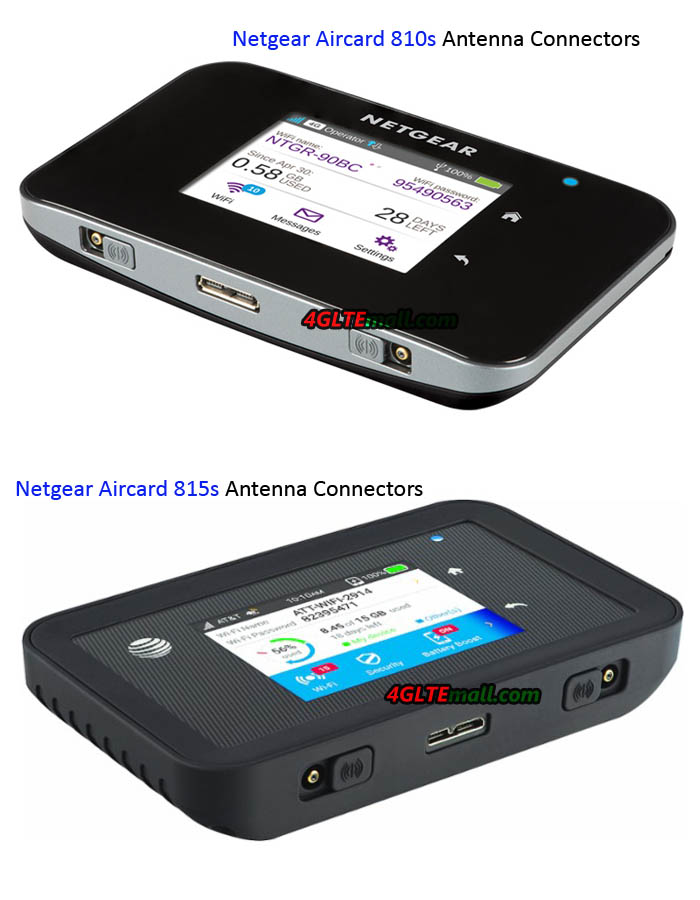
Netgear Aircard 810s Antenna connectors

We tested the hotspot with an iPhone, an iPad and a MacBook Pro connected simultaneously and did not encounter any problems. Indeed, the Aircard AC810 is able to accommodate up to 11 devices simultaneously.


AC 810 Hotspot Features

We note that the menu offers access to operators and settings that can enable WiFi 5GHz mode, allowing for better transfer rates essentially with the 4G high speed. Of course, your equipment must be compatible with the Wi-Fi standard in order to make the best. This is actually the wireless N.


Here are the full specifications for Netgear Aircard 810s for reference:

Network technology
  • 4G LTE, Class 11 with triple-band carrier aggregation
  • DC-HSPA+, HSPA+, HSPA
  • 4G LTE
  • 3G


Network bands supported
  • 4G LTE FDD 800/900/1800/2100/2600 MHz
  • 4G LTE TDD 2300/2600 MHz
  • 3G 850/900/1900/2100 MHz


Wireless
  • 11ac/b/g/n
  • Wifi Dual Band 2.4 or 5 GHz


Required configuration
  • 11ac WiFi-enabled device/b/g/n 2.4 or 5 GHz
  • Windows 10, 8, 8.1 and 7 (32/64 bit), Windows RT, Windows Vista (SP2, 32/64 bit), XP (SP3, Media Center Edition 32/64 bit) or Mac OS X 7.0 or later


Physical characteristics
  • Dimensions: 112 x 69 x 15.5 mm
  • Weight: 132 g
  • SIM card type: Micro SIM (3FF)
  • Independent activity: until 11 am
  • Standby time: up to 260 hours
  • Display: touch screen 2.4 “


Package contents
  • mobile hotspot AirCard 810 (AC810)
  • removable lithium-ion battery (2930 mAh)
  • Cable for Jump Boost
  • wall Charger
  • USB cable with Micro USB Connector
  • Quick Start Guide

We will propose soon a test for mobile use with flow measurements in several situations. Check more Netgear Aircard 4G hotspots here: http://www.4gltemall.com/4g-wireless-router/netgear-4g-lte-router.html


TP-LINK M7650 LTE Cat11 Mobile WiFi Hotspot

Internet is now very important for our daily life. So there is a great demand of gadgets for wireless connection from users. The alternative of using a mobile phone as a WiFi access point or modem is not always comfortable, and when running this function, the mobile phone may consume much battery that cannot always afford. TP-LINK gives us another option for wireless connection: TP-LINK M7650 4G LTE WiFi Router.


This TP-LINK M7650 is a new mobile pocket WiFi router upgrading from its predecessor TP-Link M7350 and is compatible with the standard LTE CAT11, which allows speeds up to 600 Mbps. It’s the most attractive feature on M7650 MiFi which also uses the protocol WiFi AC to work with the bandwidth of 5 GHz, less congested and more stable. The TP-link M7650 is compact to carry smoothly in your backpack or briefcase and with a battery of 3,000 mAh to use throughout an entire working day.

 tp-link-m7650-1  


The TP-LINK M7650 is very interesting for professionals who regularly work with your laptop outside the office, and it’s a great partner for travel. This portable WiFi router can insert a SIM data card and start connecting with the Internet in just seconds. This versatility is very useful as an alternative to using our own smartphone as a WiFi access point. The TP-LINK M7650 is based on Qualcomm chipset and compatible with the network 4G CAT11, with maximum speeds of up to 600 Mbps. So multiple devices could connect to TP-Link M7650 and surf in high speed. The maximum supported user could reach to 32 terminals.


This means that the M7650 Mobile WiFi is ready for the future, because currently the main operators could only provide top speeds of 300 Mbps. In addition, another advantage of TP-LINK M7650 is compatible with the network protocol WiFi AC. This protocol works simultaneously on both the bandwidth of 2.4 GHz and 5 GHz. This first width of 2.4 GHz is used by the vast majority of devices. However, the main problem is that it is very congested. This causes interference and loss of signal quality. Meanwhile, the bandwidth of 5 GHz is faster and more stable. The maximum speeds supported by the TP-LINK M7650 are 300 Mbps bandwidth in the 2.4 GHz and 867 Mbps in the 5 GHz. 


tp-link-m7650-2

Today, most launched mid- range and high-end devices, including smartphones and tablets and laptops, already incorporate support WiFi AC. The TP-LINK M7650 uses a compact design to smoothly take in trips and journeys. Within the design of the TP-LINK M7650, we must highlight the small screen from which we can view key data as the connection speed at which we are transmitting data, consumed data, the number of connected devices or the status of the battery.

tp-link-m7650-3

Speaking of battery, this model integrates with a capacity of 3,000 mAh that helps us work throughout the whole day without having to worry about power-off. And there is an option to expand the internal space to save files directly to the access point through a MicroSD memory card up to 32 GB. Users connected with the M7650 could share the files freely.


Here now, we only know the Netgear Aircard 810s has similar specifications to TP-Link M7650 mobile WiFi hotspot. And the aircard 810s is already available for Australia network provider Telstra. TP-link M7650 would be available for Spain carrier. We would update the news on www.4gltemall.com once it’s available here.