HUAWEI E398 4G LTE USB Surfstick(Vodafone K5005)

HUAWEI E398 4G LTE USB Stick was released earliest at 2012 MWC. Soon it become a shining star and being pursued by many operators worldwide. Since HUAWEI’s strength in mobile dongles and telecommunication equipment, there is no doubt that HUAWEI E398 will bring something new to wirelees world.

Actually, we know more about Vodafone K5005 4G LTE Stick than HUAWEI E398, probably because Vodafone takes steps faster to let his client to enjoy high speed. And Telecom follow the steps. In different countries, they have different versions as below:

Provider Model Name LTE frequencies
German Telekom Speed Stick (LTE E398u-15) 800/1800/2600MHz
Vodafone K5005 800/2600MHz
Telenor/Tele2/Telia E398u-18 900/2100/2600MHz

The technical data of the E398 are the following:

  • LTE frequencies see table above
  • LTE, category 3, ie a maximum of 100Mbit / s download and 50Mbit / s upload
  • UMTS (3G) 900/2100 MHz
  • DC-HSPA + in the UMTS network with up to 42Mbit / s download and up to 11Mbit / s upload
  • Including UMTS HSPA +, HSDPA, HSUPA
  • GSM along with EDGE and GPRS 850/900/1800/1900 MHz
  • MicroSD slot up to 32GB
  • 1 connector for external antenna (E398u-18)
  • 2 connectors for external antenna (Speed Stick LTE E398u-15, K5005)

This new USB modem product came out in the year, 2012, just after Huawei began to launch the expansion of the world’s first 4G LTE commercial network engineering. And it has only been a few months since this unlocked Huawei E398 USB modem was plunged into electronic marketplace. With more and more people have joined in life of mobile network, the 4G LTE USB Modem and Pocket Wi-Fi is becoming more and more popular at the same time. As a result, the Huawei E398 4G LTE USB Modem is really an apple in the eyes of the merchants and customers due to its powerful functions and advantages.

When talking about network experience, many people probably care the internet speed above all. Thus, it is necessary to have a portable and powerful router for those people who are always on the travel way or usually work outside. Now Vodafone K5005 4G LTE USB Modem comes out, which supports the main popular LTE frequency 800/2600MHz, can satisfy anyone who is serious about network.

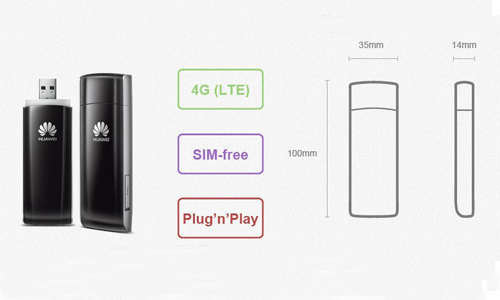
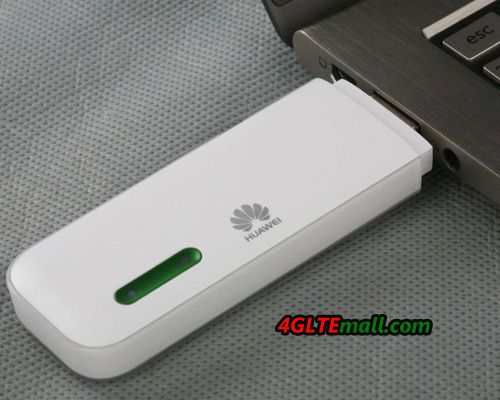
What advantages does this Vodafone K5005 4G LTE Surfstick have? Now I will show you its characters in detail. First, the unlocked Vodafone K5005 actually gets high speed, as its LTE downlink can up to 100Mps and uplink is 50Mps. Second, the unlocked vodafone k5005 supports LTE 800/2600 MHz, HSPA+/UMTS 900/2100 MHz, and EDGE/GPRS/GSM 850/900/1800/1900MHz, which has proved that the vodafone k5005 is a high class 4G LTE USB Modem product. What’s more, for the unlocked Huawei K5005, the internal antenna, external antenna connector are available. So you can play computer games and enjoy fast network anywhere and anytime. And it can operate on Windows 7/2000/XP / Vista and Mac OS. Besides the core features I mentioned above, the outline designed for unlocked vodafone k5005 is also a light spot. Its dimension is 92*32*15 mm, small and portable. It also looks smart with white body and red edge. And the weight of unlocked Vodafone K5005 is just 40g, which is light enough.

Today, the 4G wireless networks commonly operate under third generation technology networks which include Global System for Mobile communications or GSM. It is lucky and fashion to use the advanced 4G LTE technology at the first time when it comes out, because we can get a new range of services and benefits. Discovering this Huawei K5005 4G LTE USB Modem, you really deserve having it.

HUAWEI E398 Specifications:

Network Bands of different HUAWEI E398 versions:

HUAWEI E398u-1 :

* 4G LTE FDD 900/2600 Mhz
* 3G UMTS 900/2100 Mhz
* 2G GSM/GPRS 850/900/1800/1900Mhz

HUAWEI E398u-11:

* 4G LTE FDD 1800/2100/2600 Mhz
* 3G UMTS 900/2100 Mhz
* 2G GSM/GPRS 850/900/1800/1900Mhz

HUAWEI E398u-15:

* 4G LTE FDD 800/1800/2600 Mhz
* 3G UMTS 900/2100 Mhz
* 2G GSM/GPRS 850/900/1800/1900Mhz

HUAWEI E398u-18:

* 4G LTE FDD 900/2100/2600 Mhz
* 3G UMTS 900/2100 Mhz
* 2G GSM/GPRS 850/900/1800/1900Mhz
Vodafone K5005:

* 4G LTE FDD 800/2600 Mhz
* 3G UMTS 900/2100 Mhz
* 2G GSM/GPRS 850/900/1800/1900Mhz

Features:

* Qualcomm’s MDM9200TM chipset

* 2×2 MiMo, LTE category 3

* Data Speed: Download up to 100 Mbps, Upload up to 50 Mbps at 20MHz bandwidth

* Memory: MicroSD card slot up to 32GB

* HSUPA, HSPA + and dual-carrier HSPA + and Receive Diversity

* GSM with EDGE support

* Display: LED Indicator

* Antenna: Integral and 2 X External antenna interface

* GPS Enabled: No

* Dimensions: 90 x 25 x 15mm

* Weight: 40g

* Supported Systems: Windows XP, Windows Vista, Windows 7, Mac OS X 10.5.8 (and later versions)

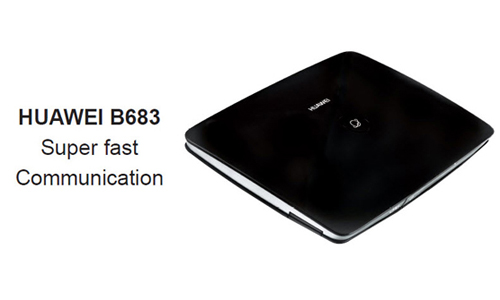
HUAWEI B683 3G Wireless Router Test and Review

Mobile Internet, which was synonymous with luxury – until recently it is now a very common and convenient way to access the global network and to surf internet. Continuously falling prices of the service make more and more people choose to use mobile or wireless network. Following the wake of growing demand for mobile internet devices, manufacturers are trying to create mobile broadband to maximize the easier and more enjoyable communication for us.


One of these manufacturers is Chinese company Huawei, which launched the HUAWEI B683 3G WiFi router. It could connects to 3G mobile network via LAN or SIM card based on HSPA + standard.

General Review

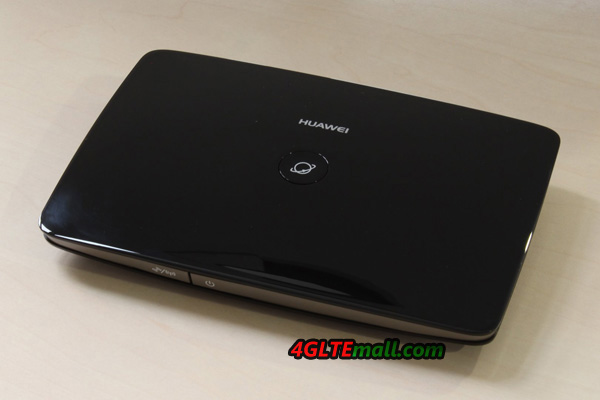
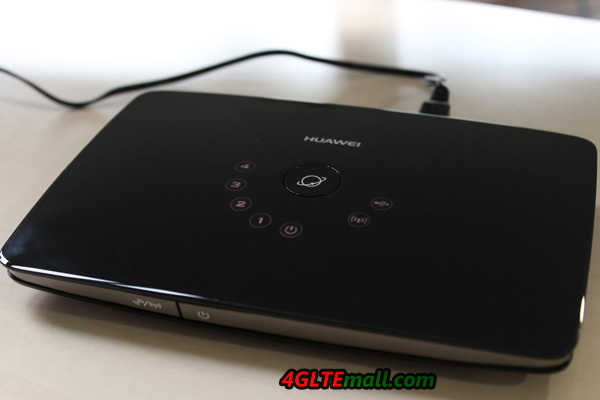
Huawei B683 3G Wirelss Router stands out from the “crowd” of other routers, its unusual, modern design. The outside plastic is used in glossy casing (so-called “piano”), which unfortunately can be seen virtually every fingerprint. If clean it up, it looks very shining.


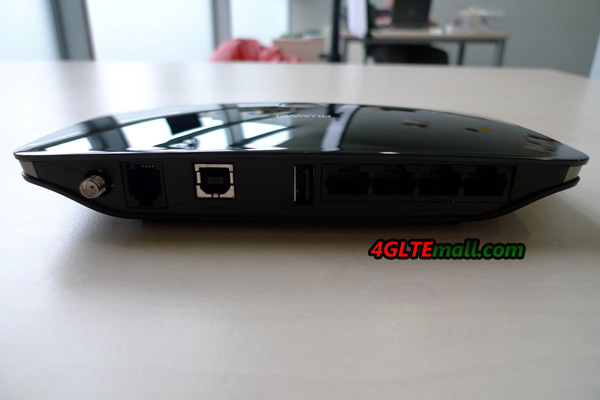
At the top of the unit is the Dial-up (used to connect to the Internet) button, the side is the ports for connections in the router (external antenna, connect the telephone line, power supply, USB port, four-port LAN 10/100 Ethernet (RJ45)).

At the front of the router there are two buttons – on / off switch and a button Wi-Fi/WPS (for creating wireless Wi-Fi networks).


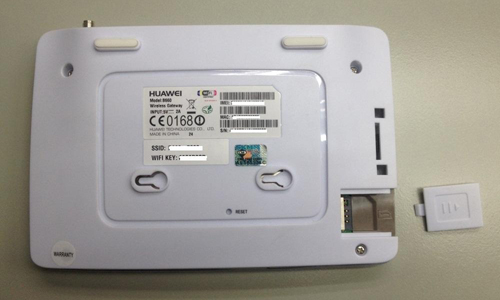
Behind the rear panel is reset button (used to restore the factory settings) and pendants, based on which we can put HUAWEI B683 stand like a wall. In this back, you will also find housing flap, concealed SIM slot grille.


The discrete icons on HUAWEI B683 3G WiFi Router informs us connection status, the icons are located around the dial-up button. The lights of the icons will keeping on when the B683 is working, so they could show us below the information clearly, even in a dark room:

* Using the USB port

* Wi-Fi/WPS active network

* Internet connection through mobile

* Power

* LAN status


Package Contents

In the box, we can find the router power adapter and user manual for instructions. Manufacturer unfortunately not provided us information about the gadgets that can connect to the device. And users have to look for an external antenna themselves and buy on their own.


Interface and Support

The device is taken out of the box practically ready for use. To use the mobile Internet, we only need to put a SIM card into and snap, and plug the snap into B683 Router. After power is on, a 3G LAN / Wi-Fi router starts working. Usually, you don’t even need to set up a profile , but if you are unlucky to do this, it’s simple and easy, the configuration wizard helps you through the whole process step by step, you just follow up the wizard and click finish. All finished and it will auto connect to internet.


If we want to use more advanced functions of the router, you have to delve into the administration panel. Do not fail the people who want to have access to a large number of network settings.

Huawei B683 3G Router could set up below configuration:

* MAC address filtering

* IP address filtering

* Setup DMZ

* Mobile network settings (including manual network selection)

* DHCP

* UPnP


Regarding the stability and speed of data transmission – during the test, they are not a big deal. Only when the Wi-Fi connected the three devices simultaneously, this is not enough for the maximum device quantity that HUAWEI B683 could connect. It could support total 32 users to share the network.

Mobile internet worked without delay, the HUAWEI B683 Wireless Router could found and correct 3G network in a few seconds. The infrastructure of the operator at the test, unfortunately, did not allow for “squeezing all the juice” from the router. The test speed that I was able to achieve a 2.05Mbit/s (download) and 0.04Mb/s (upload), even the peak speed declared by the manufacturer could reach 28MB/s (download) and 5.76Mb/s (upload). I suppose it’s due to the network environment.


Huawei also has equipped its product in several additional and very useful features. One of them is the ability to send and receive SMS messages from the admin (of course, if our operator gave this functionality).


Summary

Huawei B683 3G WiFi Router is the ideal solution for those who want to create a small network. The device is so functional that allows you to use both mobile internet and desktop – through the telephone line.


Unfortunately, the device also has disadvantages. Manufacturer begrudged accessories for the router – in the standard package, there is only power adapter, user guide, then users couldn’t anything more.


Anyhow, we still give good praise on the router performance, because the case is well fit and makes a solid impression. It is a pity that the manufacturer has applied the glossy, new material. On the other hand, this type of equipment will not touch rather too often, so the prints should not be a problem.


The most important is that when we test it, it keeps working at stable status, which is key point users concern.


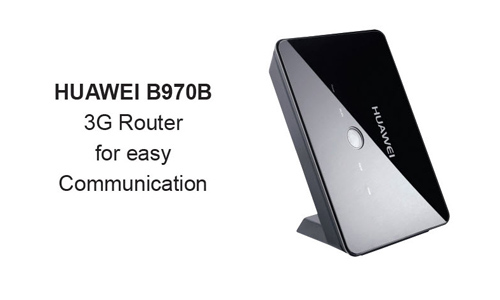
Actually, HUAWEI also has other 3G Wireless Routers, such as HUAWEI B970b HSDPA 3G WiFi Router, we will introduce next time.

HUAWEI E587 3G HSPA+ 42Mbps Mobile Pocket WiFi Router

Today we would like to introduce the latest 42Mbps mobile hotspot– the Huawei E587 Wireless Pocket WiFi Router.


As the top mobile wireless router supplier, huawei has release many E5 pocket wifi models, Huawei E587 mobile wifi router is definitely a high level device in mobile communications. This is also demonstrated once again the Huawei E587, which has been further developed and adapted to the state of the art. So the wireless chip inside radios now after the new DC-HSDPA + standard in the download and upload speed HSUPA standard, which enables data rates of up to 43.2 Mbit/s downstream and 5.7 Mbit/s upstream. Of course, the device offers the possibility to connect with lower data rates to mobile phones, but could auto selects the best available network connection. In order to achieve a good and stable network connection even in remote location, HUAWEI E587 Mobile WiFi offers a TS-9 Antenna Connection. This allows the use of a external UMTS / HSPA antenna to reinforce the signal.


Up to 5 devices can connect simultaneously via WiFi when E587 WIFI router is working. At the speed of the Internet connection of the modern N-Standard, HUAWEI E587 Portable 3G Router could reach up to 150 Mbit / s Of course, the device enables encryption of the WLAN based on the WPA2 standard to prevent unauthorized use. The E587 Pocket WiFi is also based encrypted to span not accidentally open network.


For easy data exchange, the device can be expanded up to 32GB with a microSD memory card, and thus serve as a central point of data center


The operation, as well as the initial setup is done via a clear web interface. To the microSD card can also be accessed via web interface.


For operation, only one key is required on the device. Its current state, for example, the current connection status of mobile and wireless, remaining battery capacity and also the current data volume, the information displays on organic LED and is easy to read.


At only 110 grams and with a 2200mAh battery in the unit square, in our tests, HUAWEI E587 Mobile 3g Router enabled up to 5 hours of continuous use. But if you have a mobile powerbank, it would be great for you to use much long time and share WiFi.


Do you want to exchange their old mobile hotspot to the new Huawei E587 Mobile WiFi, and enter the world of high-speed mobile internet? In our store you will find not only the Huawei E587 Pocket WiFi Router, but also the high speed model HUAWEI E589 100Mbps 4G LTE Pocket WiFi Router. If you need, there is also external antenna for you. 

ZTE MF80 43.2Mbps UMTS HSPA+ Wireless Mobile WiFi Hotspot

After we have already introduced the new Huawei E587 MiFi Hotspot in our previous post, we would like now to introduce the new 3G mobile hotspot from ZTE MF80 Portable 3G Router.


It is like the Huawei E587 Wireless 3G Router to work as a hotspot, which allows the latest UMTS specification DC-HSPA+ data rates of up to 43.2 Mbit/s downstream and up to 5.7 Mbit/s upstream.

The ZTE MF80 weights only 97 grams, it is lighter than E587, despite increasing functionality as the Huawei E587. The dimensions of the ZTE MF80 fits in your shirt pocket, because it is 102x55x16mm from the base, pocket size just as small as a credit card. Up to 10 devices can be connected to the ZTE MF80 Mobile WiFi Hotspot, the MF80 has sufficient reserves in any situation, even if the Internet connection in the office or in the University is once again disturbed.

It also incorporates Li-Ion battery of 1900 mAh, up to 5 hours working.. If you want to stay longer online can also connect it with the included USB cable to his computer and even use it as a normal USB modem, as one would expect from a UMTS surf stick.

However, the ZTE MF80 is significantly more comfort than an ordinary surf stick. Thus it provides the auto-APN recognition worldwide in 99% of SIM cards that you only need to place your SIM card into the device and have the fun really surfing. The connected devices can be governed by the Wi-Fi b / g or n standard to connect to the MF80 and thus spark a maximum data rate of 150 Mbit / s each. The connection is encrypted, of course after the WPA2 standard from the factory, so you need have no fear of unwanted co-users. So this mobile hotspot can be ideal in their office environment or in your holiday home, where you can share information with their family holiday greetings and receive news from home.

The overall management, such as changing the wireless password, settings around the router functionality and more is done by a modern and intuitive web-based interface.


As a special eye-catcher, the ZTE MF80 Wireless UMTS Hotspot, with an OLED display, which provides information about the signal strength of the cellular network, the connection type, the battery level, the number of devices connected and other data, is ideal for holidays, for example, the display indicates whether the roaming Activates. This protects you while surfing abroad against high bills from your provider or a rapidly discharging prepaid card. For a more detailed list of possible display information and more detailed information visit our store.


In order to provide better reception even in remote locations, the ZTE MF80 offers the possibility of a UMTS antenna with TS-9 antenna connector, such as this one to join.

We hope that this post has helped to learn about mobile hotspots, and we have facilitated the purchase decision.

HUAWEI E589 4G Pocket WiFi Router Review– Smooth and Stable 4G Router

After months waiting, finally, we get this hot 4G LTE Pocket WiFi Router – HUAWEI E589 4G LTE Mobile WiFi Hotspot. It’s said that this is the most popular and fastest 4G Pocket wifi router. Everyone wants to see how fast it is.

Huawei is the leading company who search and develop the portable WiFi router from 3G and 4G, and HUAWEI E5 series hotspot is the most popular pocket wifi all over the world. Since the 4G era comes, it’s no doubt HUAWEI E589 will become the shining star in the mobile 4G Router market.

Now we touch the new slim art, feel very good. The craftwork can compare with iPhone. When you touch it, you may feel it’s not an WiFi router, it’s an art. And at first glance, you may think it’s a mobile phone. It’s designed in pocket size and a small 1.45 inch LED screen. The dimensions are 113 x 62 x 13.5 mm and then the internal battery of 3000mAh which should give around 6 hours of web browsing on 4G network, you can connect up to ten devices to the router. When it power on, it will show the signal strength, battery level, the operator, network connected and how many devices are connected.

Besides the ability to connect to the 4G network, it can also connect to 2G, 3G network where no 4G network available.  On the 4G network, it can connect to the network using the following frequency bands: 2600, 2100, 1800, 900 and 800MHz, which means that it support almost most of the 4G LTE networks and operators all over the world.

HUAWEI E589 Mobile 4G LTE Router also has room for microSD and a socket for the antenna, if you are on a boat or in a caravan and want to access higher speeds, you can easy make it true with an external antenna. The device is loaded with a Micro USB cable which of course included in the box. And it could help to recharge the power and the extra function is to work as a USB modem.

Huawei wanted to create a router that is easy to use and therefore there are no menus to scroll through. The three buttons on the page is to start it up, show the SSID and password, and turn on and off WiFi. The simplicity is very good, because this is a product that does not require any knowledge of technology; touch of a button to start followed by two button to get SSID and password and you’re ready to start surfing.

Speed test:

It’s a pity that we didn’t get any monster speed from the test even in different places. Perhaps the network environment is not as good as wish, or many people are sharing the network at the same time around my test places, we reached the peak download speed up to 32Mbps, which is far from the maximum speeds of 100Mbps. But at the same, we found the average download speed is around 15Mbps,  which is about ten times of what you normally get through 3G network. We also use the SIM to test with HUAWEI E392 4G LTE USB dongle, and the result is almost the same. So we think it’s the network limit, not the device fault. Or perhaps there are other factors.

There is no problem for HUAWEI E589 LTE MiFi to connect 10 WiFi devices after the test, and the WiFi signal coverage is in large range. When we divided us into small areas, we can still get stable speed. Even when we were below ground level surrounded by cement walls, we could get sufficient speeds of around 5-7 Mbit/s .

The biggest advantage is that the router did good transitions between 3G and 4G, which resulted in that we did not lose connection just due to we were out of reach for a 4G network.

After being turned on for a few hours, the temperature is low of 30 – 35 °C, which is great to have in your pocket.

HUAWEI E589, also named HUAWEI E589u-512, below is the specifications for details features:

HUAWEI E589u-512 Specifications datasheet.pdf

A smooth shape, long battery life and good signal strength is important for a mobile MiFi Router, HUAWEI E589 LTE MiFi incorporates them all, with easy operation, it’s really a perfect mobile WiFi router for 4G. It’s clear now that HUAWEI E589 mobile 4g router is one of the best 3G 4G pocket wifi router.